February 4, 2025
Solved

Guided Reporting Duplicate Param Dialogue Box Showing on Run or Param Change

  • February 4, 2025
  • 2 replies
  • 0 views

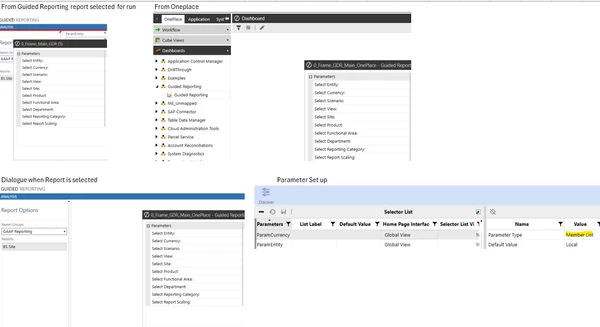
Hi OneStreamers, I'm currently working with the Guided reporting solution in OS v8.4.0. When running the report in the GDR homepage a duplicate dialogue box appears after the Guided Reporting Dashboard is selected via the OnePlace menu item, once a report is selected, or after a Parameter is changed anytime the Parameter combo box is changed. Each Parameter is set up a Member list at the moment but were previously discovered as Member Dialogue, and now rediscovered as the updated Member list param. 

Any Idea what I could be missing?


Best answer by ajackett

I thought here was my last resort after trying everything, but I think I've found the answer...

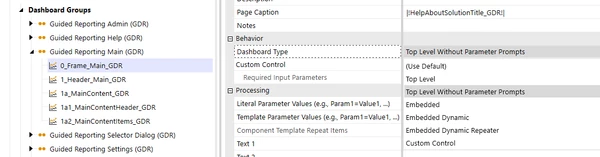
I navigated to the Dashboard that was prompting the parameter dialog box, and found this setting:


I changed the Dashboard Type under Behaviour to be Top Level Without Parameter Prompts, and it works!!

2 replies

February 6, 2025

I'm wondering if this is a bug in v8.4?  I did some testing of my own and am seeing the same behavior.  I get the same parameter pop-up regardless of if my parameters are in the same workspace (Default) or their own workspace that is set to 'Is Shareable Workspace = True'.

Wondering if JackLacava or anyone else can impart some wisdom here?

Thanks!

May 9, 2025

Hi guys, 

Just wondering if you managed to solve this? I am also using Guided Reporting in v8.4 and now I get the Parameter dialog box pop-up even whenever a selection is changed. Not exactly user friendly... any ideas JackLacava​?

Thanks!

ajackettAnswer
May 9, 2025

I thought here was my last resort after trying everything, but I think I've found the answer...

I navigated to the Dashboard that was prompting the parameter dialog box, and found this setting:


I changed the Dashboard Type under Behaviour to be Top Level Without Parameter Prompts, and it works!!