
March 3, 2025

Hide zero data from a chart

  • March 3, 2025
  • 2 replies
  • 0 views

We have a chart in which data will be at 0 for most of the year.  Is there a way to tell the chart not to print the remainder of the line if it is 0?  We tried to set up a member to return Nothing if the data = 0.  It looks like the chart is interpreting Nothing as 0.  Is there a way Ii can say if a cell is 0, set it to NoData.  And would that make the chart stop showing the lines on 0?
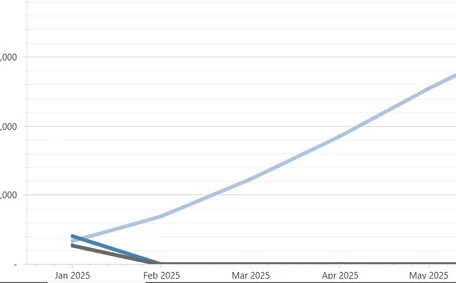


As we move through the year the actual number will get bigger and the drop to 0 for the remaining months will look even worse.

Thank you,

Scott

2 replies

March 3, 2025

Can you set "Suppress Zeros" property to True? It's located under the Chart Data grouping. This should remove all results equal to zero.

March 3, 2025

DRider, thanks for the response. 

It is already set to True; this may work if all periods for the member had 0.  Once it gets data the rest of the chart drops to 0.

I accidentally set your response as the solution, but I undid it right away. 

Scott

March 3, 2025

Is this chart using cube data? If so, I would check the following on your cube view settings:

Suppress Zero Rows/Columns should be enabled

If Use Suppression Settings on Parent Rows/Columns is set to True, it will apply your suppression settings to parent rows and columns as well

Last, is there anything in the data source configuration that could be overriding these settings? Do you see the zeros if you test the data adapter (may not be possible) or run the cube view independently?