
February 8, 2024

How to add a Column Header on top of the Dimension headers that show up on the report

  • February 8, 2024
  • 2 replies
  • 0 views

Hello,

 Need some help to introduce an extra header on top of the Dimension header that shows up on the cubeview.

I can get the count and the $ but am not sure of how to introduce the Operating Plan. 

Any help would be appreciated.
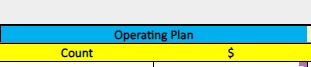
IBK_0-1707436369547.png

Thank You,

Indu

2 replies

February 9, 2024

Hi Indu,

Try putting in the 1st dimension definition row from the 1st CV column, a dimension which is not used elsewhere and then you'll overwrite its name. For instance "U8#None:Name([Operating Plan])" 


CarlosAlvear_0-1707470182513.png


Good luck

Best regards,

Carlos

IBKAuthor
February 12, 2024

Thank You Carlos. I tried this but I am not able to merge the 2 columns to show as a common header.

-Indu