
November 8, 2023

How to add two dimension hierarchy in same row/column

  • November 8, 2023
  • 3 replies
  • 0 views

Hi All,


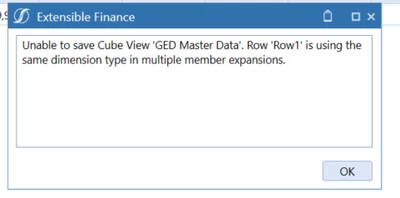
I have a dimension hierarchy like Account1(parent) and Account2(parent) hierarchy members in Account Dimension and i need those base members in the same row/column. I tried adding those members and got below error, can anyone suggest how to resolve this.
STDN_0-1699454343113.png

Thanks in Advance.

3 replies

November 8, 2023

Hi,

If I understand your question right you are trying to have two different accounts on the same row of your cube view, so Acc A and Acc B would be side by side.

I imagine Acc A and B would have different data against them so not sure what you'd like the cube view to display, in terms of data, for that Acc A, B row? 

November 9, 2023

If you're trying to list both in a row OR column, you would list the member filters in the same expansion. You cannot use one dimension (e.g. Account) in both a row and a column.

Good:

chul_0-1699547178953.png

Bad:

chul_1-1699547245690.png


November 14, 2023

Hi - are you trying to show the data based on the base level account but also show the base account's parent on the same row for reference? If so, you can use a UD8 (or wherever your random dynamic members are) member set up as a dynamic calc with a formula pulling the parent as an annotation member. You'd then pull that UD8 along with V#Annotation in the CV to show the account parent. 

We currently do this with our UD2 dimension so if this is what you're trying to accomplish and the formula would be useful, let me know and I'll share. 

January 12, 2024

Hi Nicole NicoleBruno , Can you please share the formula you are using in UD8? I am doing something like this :

Dim U2Filter As List(Of Member) = api.Members.GetBaseMembers( _
api.Pov.UD2Dim.DimPk, api.Members.GetMemberId(dimtype.UD2.Id, "TopUD2"))

For Each memberObj In U2Filter
' memberObj.Name is an actual String
BRApi.ErrorLog.LogMessage(si, memberObj.Name)
next

but its not working out.

January 29, 2024

Hi - apologies but I left my role at Endo and no longer have access to the calculation. Sorry!