How to Dynamically Report on Extended Members from the Top Consolidation Cube?
Depending on the circumstances, you could find yourself into a situation where you need to report numbers on Extended dimension Members from the Top Consolidation Cube. In a Vertical Extensibility Cube set up this gets tricky since the data is only available at the lower cube levels.
To work-around this challenge (considering the limitations exposed below), I have created a dynamic calculation Business Rule that allows you to achieve that by leveraging a specific UD8 Dynamic calculation Member.
Following it is an overview of the Solution:
Problem Statement:
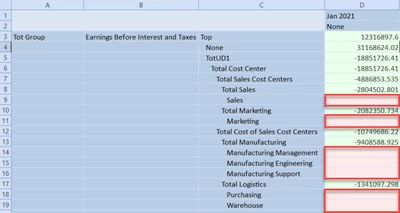
- When using Cube Vertical Extensibility, reporting from Tot Group cube is not possible for those dimensions that have been extended.
In the example, UD1 is only available at Summary Level for Tot Group:
Solution Overview:
- UD8 Dynamic Calculation to derive the Extended members from the Base Entities consolidating to the Parent Entity Level (E#Tot Group). Data is dynamically retrieved from the base entities and translated on the fly based on the Parent/Child Entity relationships:
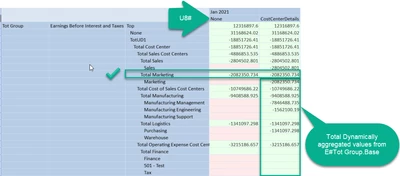
- Works with any extended Account Type Dimension (A#, F#, U1#-U7#) without having to modify the Business Rule.
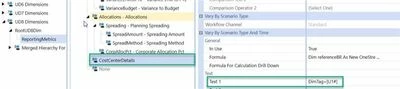
- Dynamic Calculation driven from the UD8 Text1 field:
Considerations:
- Solution aggregates and translates on the fly the base data without:
- Eliminations
- % of Consolidation (It could potentially be incorporated into the solution)
- Suitable for reporting/analysis being done at O#BeforeElim.
- When used in large Cube View/Quick Views queries could create slow retrieval performance.
Technical Set Up:
- Create the UD8 Member and Define the Text 1 property referencing the Dimension Tag you’d like to report on (Ie: DimTag=[U1#]).
- Add the following Member Formula within the UD8 Member:
Dim referenceBR As New OneStream.BusinessRule.Finance.XF_DynamicExtensibilityReporting.MainClass
'Return referenceBR.DynamicProductReporting(si, globals, api)
Dim Value As Decimal = referenceBR.DynamicExtensibilityReporting(si, globals, api)
If Not Value.Equals(0)
	Return Value
Else
	Return Nothing
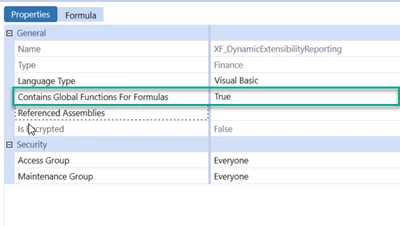
End If- Create a new Finance Business Rule, make sure that the Business Rule is set to Global: