April 17, 2025
Solved

How to pull Workflow Start time to Workflow end time in Report(Cube View)

  • April 17, 2025
  • 2 replies
  • 0 views

Hi Team,

Generally, In Scenario settings will updated the "Workflow Start Time & Workflow End Time". so here we want to get these workflow time rang in Cube View. (Eg: Work Flow Start Time: 2025M6 & Work Flow End Time: 2026M5). Based on scenario selection in  the report, we should get the (12 periods) time range in report.  Please help us to get the solution.

Thank you,

Shiva Prasad

Best answer by sameburn

Hi ShivaPrasad​ 

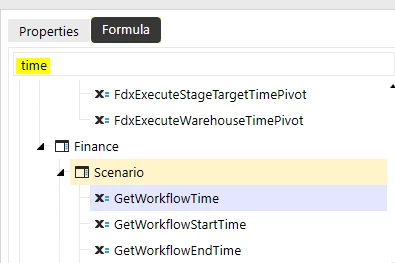
There are api's to retrieve those values for you.  If you search for "time" in the snippet library, you will find them under Scenario e.g. see below


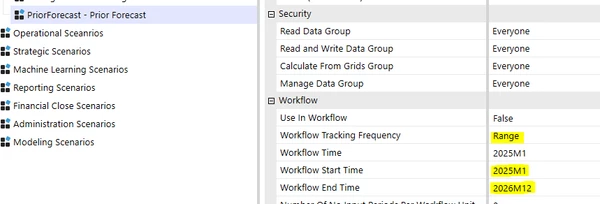
Here is an example to return the time range for a Scenario with Workflow Tracking Frequency -> Range
Sample Code:

	' Declare scenario name
	Dim scenarioName As String = "PriorForecast"
	
	' Retrieve scenario ID
	Dim scenarioId As Integer = ScenarioDimHelper.GetIdFromName(si, scenarioName)
	
	' Retrieve Workflow Start Time from Scenario
	Dim startTimeID As Integer = BRApi.Finance.Scenario.GetWorkflowStartTime(si, scenarioId)
	' Retrieve Workflow End Time from Scenario
	Dim endTimeID As Integer = BRApi.Finance.Scenario.GetWorkflowEndTime(si, scenarioId)
	
	' Derive list of times within range and return as List(Of String)
	Dim objList As List(Of String) = TimeDimHelper.GetIdsInRange(startTimeID, endTimeID). _
									 Select(Function(time) TimeDimHelper.GetNameFromId(time)).ToList()

	' Log result as comma separated values
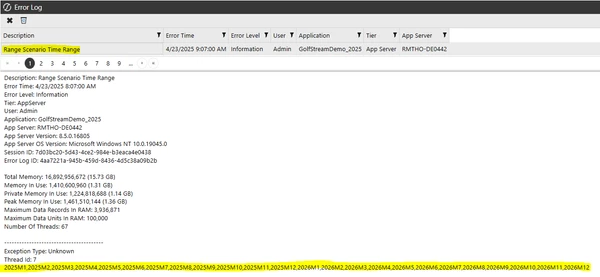
	BRApi.ErrorLog.LogMessage(si, "Range Scenario Time Range", String.Join(",", objList))

Log Output:
Thanks

Sam

2 replies

sameburnAnswer
April 23, 2025

Hi ShivaPrasad​ 

There are api's to retrieve those values for you.  If you search for "time" in the snippet library, you will find them under Scenario e.g. see below


Here is an example to return the time range for a Scenario with Workflow Tracking Frequency -> Range

Sample Code:

	' Declare scenario name
	Dim scenarioName As String = "PriorForecast"
	
	' Retrieve scenario ID
	Dim scenarioId As Integer = ScenarioDimHelper.GetIdFromName(si, scenarioName)
	
	' Retrieve Workflow Start Time from Scenario
	Dim startTimeID As Integer = BRApi.Finance.Scenario.GetWorkflowStartTime(si, scenarioId)
	' Retrieve Workflow End Time from Scenario
	Dim endTimeID As Integer = BRApi.Finance.Scenario.GetWorkflowEndTime(si, scenarioId)
	
	' Derive list of times within range and return as List(Of String)
	Dim objList As List(Of String) = TimeDimHelper.GetIdsInRange(startTimeID, endTimeID). _
									 Select(Function(time) TimeDimHelper.GetNameFromId(time)).ToList()

	' Log result as comma separated values
	BRApi.ErrorLog.LogMessage(si, "Range Scenario Time Range", String.Join(",", objList))

Log Output:

Thanks

Sam

April 24, 2025

Hey, I have built XFBR to pull 12 months range and pulled in the column in the CubeView, DM etc.
You could put above formula mentioned by Sam in the XFBR and use it cubeview.