
October 23, 2024

How to shorten the length of a report margin - Auto fit to Page Width is set to True.

  • October 23, 2024
  • 1 reply
  • 0 views

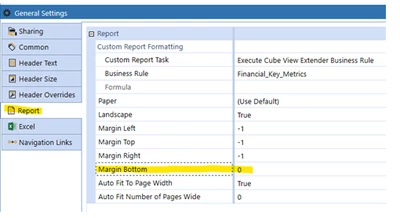
Looking to shorten a report so it fits on one page. The Auto fit to Page Width is set to True.

Using General Settings, Report, is this achieved by adjusting the bottom margin? 

How else might this be achieved if the above is not the option. 


GreenTea_0-1729718095079.png


1 reply

October 24, 2024

With auto fit to page width on you could try INCREASING the left and right margins (this should naturally scale the report down.

For info, the latest release of OS also has a Scale Factor that can be manually applied to the report. For example, scale the report to 75% size (auto fit to page width must be switched off to access this setting)


KarlT_0-1729758159831.png

CLUAuthor
November 1, 2024

Thank you KarlT... this worked.