
June 21, 2024
Solved

Hyperlink Options in BI Viewer

  • June 21, 2024
  • 2 replies
  • 0 views

Hi - I am working on a BI Viewer dashboard and need some help with hyperlink formatting.  I am using a SQL data adapter to an external database which amongst other things, is fetching an internet URL which we are trying to display as a hyperlink with alternative text.  Ideally we'd be able to display text from an alternate line item but I'd settle for something static (i.e. "link").  Thus far I haven't found a way to display anything other than the link text itself and couldn't find anything in the documentation that references the "hyperlink" option under "Data Items / Column Options".

Example of current output:

stribou_0-1718981534027.png

Any help would be greatly appreciated!
Best answer by stribou

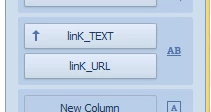
So I ended up finding a solution and it was actually pretty simple / natively available from OneStream - when converting a column type to hyperlink, you have the option for two data fields - the top controls the display value and the bottom controls the link value.  More complicated links can be resolved in the column options pane;

stribou_0-1718989982686.png


2 replies

June 21, 2024

Hi, I am not aware of such a functionality within BI Viewer. Fingers crossed someone can point you to it. 

If not, this seems like a good item to raise via IdeaStream to hopefully get this on the agenda of the development team!

stribouAuthorAnswer
June 21, 2024

So I ended up finding a solution and it was actually pretty simple / natively available from OneStream - when converting a column type to hyperlink, you have the option for two data fields - the top controls the display value and the bottom controls the link value.  More complicated links can be resolved in the column options pane;

stribou_0-1718989982686.png


June 21, 2024

Awesome, thanks for sharing!