May 13, 2024
Solved

Identify unused Cube views

  • May 13, 2024
  • 2 replies
  • 0 views

HI All,

Is there a way we can identify which cube views have not been used/opened for say last 6 months to a year?

 

Best answer by Krishna

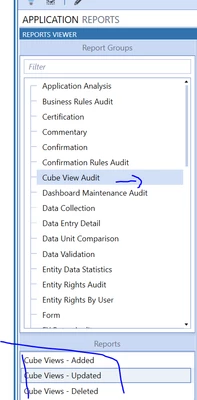
Onestreamer92  - You can run the Cube View Audit Report from Application Reports Market Place solution. It will provide the details of the CV modification, New & Deleted, you can specify the time range. On a separate not always group the CV so it is easy to identify the Live one vs Archive. Hope this Helps

Krishna_0-1715615605614.png


2 replies

KrishnaAnswer
May 13, 2024

Onestreamer92  - You can run the Cube View Audit Report from Application Reports Market Place solution. It will provide the details of the CV modification, New & Deleted, you can specify the time range. On a separate not always group the CV so it is easy to identify the Live one vs Archive. Hope this Helps


Krishna_0-1715615605614.png


May 13, 2024

You can download the Run Statistics utility from OpenPlace on the solution exchange. It will tell you the last run time of every CV.


EricOsmanski_0-1715627220997.png


November 12, 2024

Hi Eric,

Do you have the link for this utility? I am having issues locating this in OpenPlace.


November 15, 2024

Looks like you cannot link directly to it, but it may be on the 2nd page of OpenPlace. The pages are on the bottom of the screen.


EricOsmanski_0-1731674585296.png