
February 8, 2024

Issue in Web Content and File Viewer component to directly open a HTML file in a browser

  • February 8, 2024
  • 7 replies
  • 0 views

Dear community,

I currently have an html document which is located in the file Explorer under "Documents/Public" folder.

I am trying to get this HTML document to be presented into the components, embedded in a dashboard. However, with either a Web Content component or a File Viewer component (which will pinpoint to this specific file in Application Database File, as soon as I open the dashboard, it will load the html page into my default browser...
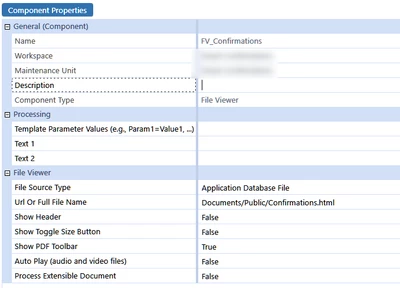

Sergey_0-1707407991556.png

I am using OS v8.1 ... is it a known bug or the expected behaviour ?

What is even more strange, directing the Full File Name to a URL will correctly open a document in a dashboard ...

Regards,

7 replies

February 8, 2024

I ran into this as well. Was hoping to use a static site generator for dashboard help pages and have the content saved as dashboard files.  But the web viewer component was opening everything in a local client browser, not the dashboard component.

Let's claim its a bug so they fix it 😉

February 8, 2024

I agree that this looks like a bug, happening as soon as you specify the content as coming from a file rather than URL. Sergey can you file it with Support please ?

February 13, 2024

Same issue. Let us know if you find a solution or reply from OS. Thanks.

May 15, 2024

Sergey what is the status of this bug? Any news?
Or did you find a workaround?

SergeyAuthor
May 21, 2024

Hi !

I got the message it was not considered as a "bug" ... There is a workaround though !

The workaround would be to use File Viewer component to refer to the .html page which should be on the server. For instance, I refer to "file://localhost/c:/pathtofolderyouwant/confirmation.html" in file viewer, and I chose a "URL" type, then it opens in the application as expected !

Regards,

May 21, 2024

Sergey I added the file under FileShare/Applications/Golfstream/Contents/test.html and then I added this path in the fileviewer as URL : file:///D:/OneStream/Fileshare/Applications/Golfstream/Contents/test.html
It is indeed reading something within the dashboard but it returns an error  when i look at the HTML console on my computer : 
Not allowed to load local resource: file:///D:/OneStream/Fileshare/Applications/Golfstream/Contents/test.html

However, when I run this from my local browser on the on-prem server, the page is returned fine.

May 21, 2024

Thanks for your update Sergey . FYI, I contacted OS last week and they mentionned that they are aware of this "malfunction" (did you noticed, i cleverly avoided the word "bug" 😂)  They noted it is an issue that will be solved, but no idea when.

May 21, 2024

We are looking into simple static site solutions as well since "no idea when" is how must of our bug reports and enhancement requests have gone.

If others are curious we are exploring:

Material MkDocs

Docusaurus

GitBook

Bookstackapp

July 25, 2025

Hi Sergey​ !
Hope you are doing well.
Do you have an update on this? We are version 9 and we still can not make this work.
I really would like OneStream Windows App to be able to render HTML pages within the windows app itself! (and not in my browser). JackLacava​ Any update on this too? 

April 24, 2026

Hi all,

URL reference works fine, so we can put things on a shared storage in cloud. 

Of course, for simple things would be nice to have Workspace File Reference working.

Regards

FabioG