
October 15, 2024
Solved

Known issues with version 8.4 (PF-21833) - Member Filters

  • October 15, 2024
  • 4 replies
  • 2 views

This is the note in the release note version 8.4.

'Use of Cube View Member Filter Where Clause with HasChildren=True is only supported
on dimensions assigned to the Default Scenario Type. (PF-21833)'

Can someone point to where I can look to see if the dimension assigned to the Default Scenario Type?

Trung


Best answer by sameburn

Hi trunning

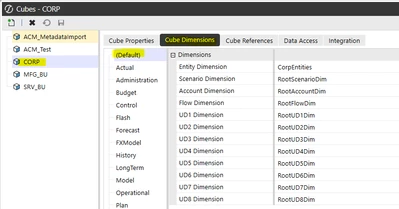
I believe this is referring to the Default Scenario Type in your Cube Dimensions setup, based on the description


sameburn_0-1729065792676.png


Hope this helps


4 replies

sameburnAnswer
October 16, 2024

Hi trunning

I believe this is referring to the Default Scenario Type in your Cube Dimensions setup, based on the description


sameburn_0-1729065792676.png


Hope this helps


October 16, 2024

Hi, you can find this under Application >> Cubes

Then select your cube and (Default) under Cube Dimensions:


Henning_0-1729065792902.png


October 16, 2024

At least we are consistent Henning 😄

October 16, 2024

😂

trunningAuthor
October 16, 2024

Thank you both.  Appreciate the screenshots.  Very helpful.

December 22, 2024

This is not a new issue.  It has been like this for some time already.  If required, you can look to creating BR's to assess similar.  Not as hand as HasChildren but at least a way.

Watch out for multi cube.