June 25, 2024
Solved

Max Calculation in CV

  • June 25, 2024
  • 2 replies
  • 1 view

Hello,

I'm writing a cube view and our old report (not in OS) has a max value calculation in the columns that looks at the current years values for each entity. I tried writing a GetDataCell(Max(A#Account)) but it's giving me no values. I looked through Golf Stream but didn't find anything but a member ranking which doesn't help. I've also looked at the other Min/Max posts, but they're not exactly what I need.

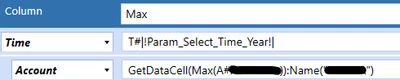

WillVitale_0-1719348763832.png

WillVitale_1-1719348804920.png

WillVitale_2-1719348842349.png

Thanks,

Will

Best answer by Henning

Hi Henning,

if I want it to be different accounts (dynamic) how would I go about setting that up? 

Sorry for all the questions, I don't make these really, so learning as I go.


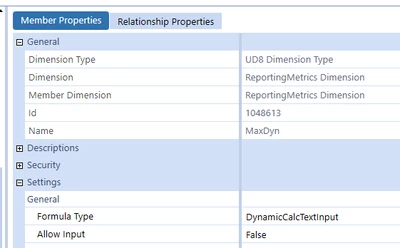
Here is a simple example, displaying the max amount of the prior two periods. I set up a UD8 member:


Henning_0-1720079196780.png

...which returns the max amount from my account 40000 from T#POVPrior1 and 2 using this member formula:

Dim dAmount_1 As Decimal = api.Data.GetDataCell("A#40000:T#PovPrior1:U8#None").CellAmount
Dim dAmount_2 As Decimal = api.Data.GetDataCell("A#40000:T#PovPrior2:U8#None").CellAmount

Dim myArray As Decimal() = New Decimal(){dAmount_1, dAmount_2}

Return myArray.Max()


2 replies

June 26, 2024

Hi, I think you will need a dynamically calculated member or a custom GetDataCell expression.

I would go the dynamic member route, e.g. by setting up a UD8 member U8#MaxPrevious12Periods. You will pull the time and account (etc.) from the POV, and then check the values for each of those intersections of the previous 12 months (assuming this is your time span) and then just return the maximum value out of those. Please note that this will not be super performant and I would recommend using this in smaller cube view only as you will be pulling data from multiple data units.


June 26, 2024

Hi Henning,

Ok, I will give this a shot. It's only 1 account, so I don't think the performance should be bad. Since I don't make Ud8's often, do you know the formula I would use?

Will

June 27, 2024

Hi, as always many roads lead to Rome.

I would create a loop over the previous 11 periods and pull the data using GetDataCell such as this:

Dim dAmount As Decimal = api.Data.GetDataCell("A#Accountxyz").CellAmount

Add the amounts into an array and then pull the maximum amount out of that array and return the max amount using something like this:

Dim maxAmount = myAmountArray.Max()

Return maxAmount 


August 8, 2024

Thank you!

I created a DynamicCalc member in my application using the above formula and it worked!

Now I'm trying to create another formula that will give me the time that the max value happened. Any suggestions?

Max

August 9, 2024

Hi, you can use e.g. a multi-column list box or create your own public class instead of an array in which you store the amount and the time. Multidimensional arrays exist as well, but I have not tested how the max function works with that.
Or, probably the easiest (though not the "prettiest" in coding terms) solution is using the IndexOf function to find the max amount position in your array and derive the period from that. If you google "IndexOf Array VB.Net" you should find enough examples to get you started.

In essence, there are many ways to go about it and I do not have the single golden path ready in this case.