
May 20, 2024

Member Filter in Cube View

  • May 20, 2024
  • 2 replies
  • 0 views

Hi all,

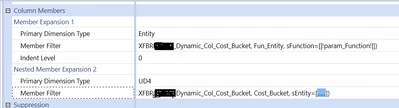
I have created cube view wherein I have used E#Test.Base in Member Filter 1  (Test have 2 children A and B). I need A and B in Member Filter 2 to act as param value in the Dashboard XFBR String. How can I achieve this ?

100Rub_0-1716200518150.png

Thanks


2 replies

May 20, 2024

100Rub  - My Assumptions is that entity derive UD4. If so you get the entity parameter in XFBR and return UD4.


May 21, 2024

Hi,

If i'm understanding correctly that your U4 is dependant on the entity the you could trying combing this into a single XFBR in the entity which returns "E#entityA:U4#memA, E#entityB:U4#memB... etc."

Then in you General Settings, under "Header Overrides" you can switch off default row headers and ensure Entity and U4 are both showing.

Alternatively, if these are general "Default" values for each entity, then you can assign then to the "UD4 Default" setting on the entity member itself. They can then be referred in any cube view using "U4#EntityDefault". The cube view won't show the U4 name in the column however, instead showing "Entity Default", but if you drill down on the data you will see that it's the correct intersection. Check out the design and reference guide for more information on this feature.