August 13, 2024
Solved

Narrative Reporting File Upload

  • August 13, 2024
  • 7 replies
  • 4 views

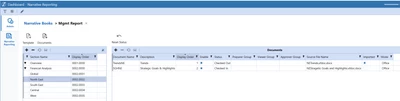
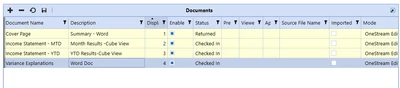
Hi, has anyone figured out how to add files to Narrative Reporting. In the Admin area I have blanks in the Source File Name column for my documents. I cannot seem to figure out how to add word docs and cube views into the fields.

Cpulvidente_0-1723568537224.png

Ideally, I would want the package to populate out a cover page which would be summary of MTD and YTD results followed by a page for both results in Income Statement format with a variance explanation page last.

Thanks for any help in advance
Best answer by consulting_guy

Hello,

To add file, please see below -


consulting_guy_0-1726125486845.png

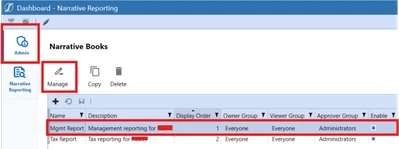
First, select Admin on the top-left, then select the Book you've created (for me, it's Mgmt Report). Thereafter, you'll select Manage.

You'll then be prompted to this screen -


consulting_guy_1-1726125660483.png

In this screen, you'll have to select your section (under Section Name) and select Document after, you'll then be able to load your documents.

All the best,

Q

7 replies

August 20, 2024

I am in the same boat, hope someone knows.

September 12, 2024

Hello,

To add file, please see below -


consulting_guy_0-1726125486845.png

First, select Admin on the top-left, then select the Book you've created (for me, it's Mgmt Report). Thereafter, you'll select Manage.

You'll then be prompted to this screen -


consulting_guy_1-1726125660483.png

In this screen, you'll have to select your section (under Section Name) and select Document after, you'll then be able to load your documents.

All the best,

Q

September 12, 2024

Hello,

On my side, in order to load a template, I have to :

  1. Select the section, then the document I want to upload a file to
  2. Write the name of the document in the "Source File Name" column and save
  3. Click on the button called "Documents" to upload the file with the name that I have specified.

Could you please try this way and let us know if it works ?

September 18, 2024

yes! this i what i ended up doing ant it works! Thanks!

November 7, 2024

Hi, 

I have proceeded with the intructions in order to load a document, but I got the following error:


Ruben_GT_0-1730977694785.png

I have specified the dource file name as the same in the word document that I want to upload. What can be the issue?


Thanks in advance!

Kind regards,
Ruben


November 7, 2024

This document name seems off. You should have the exact same name between the word document thar you upload, and the name of the document that you provide.

Regards,

November 7, 2024

Thanks for your answer! The issue was related a duplication of ".docx" at the end of my doc (it was hidden in my word document)