April 22, 2024
Solved

Open DataExplorer from Dashboard Button

  • April 22, 2024
  • 2 replies
  • 0 views

Has the syntax for Navigation Action changed to include workspace name in .v8?

We have buttons that open up cubeviews that have been working fine in the past, but now don't work since we upgraded to .v8.1. 

Others actions like open up workflow or other dashboards work fine. Just DataExplorer that's not working.

TIA
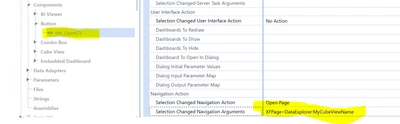

ghoang_0-1713802894807.png


Best answer by Krishna

I just tried it, didn't work. Nothing happened when I click on the button.


ghoang  - Hmm... As far I know the syntax did not change. You can create a support ticket and verify because it was working in V7.4. Please keep me posted on the solution. Thanks


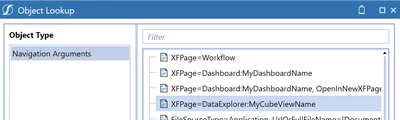
Krishna_0-1713811358509.png


2 replies

April 22, 2024

ghoang  - Is part of the default workspace or it is a new workspace? Also check the below Post.

Solved: Is there a list of the XFPages options for a dashboard component? - OneStream Community (onestreamsoftware.com)


ghoangAuthor
April 22, 2024

It's a default workspace. We have had it for a while in 7.4 and it's been fine, now it's not when we're in 8.1

April 23, 2024

Yeah, it looks like something is broken. Please open a case with Support to validate it.

As a temporary (and awkward) workaround, you can use XFPage=CubeViews:MyCubeView . It will open the CV design page, and you can run it from there. I know this might not be viable for users who don't have access to the design page.

ghoangAuthor
April 23, 2024

Thanks. We'll enter a ticket. The workaround won't work for us unfortunately, because most users don't have access to the design page.