November 23, 2023
Solved

Organizing the values of a data adapter in a pivot grid

  • November 23, 2023
  • 1 reply
  • 0 views

Hello again, I am creating a pivot grid through a data adapter that works with SQL. The issue I have is that my column of months is not organized in the pivot.

Values example:
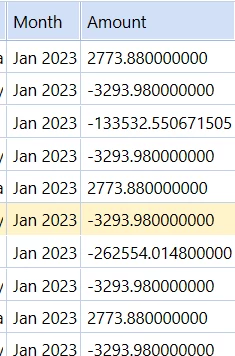

Marco_0-1700763029417.png

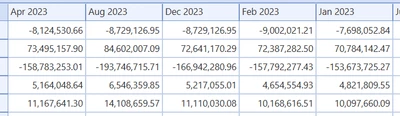
Values in the pivot grid:


Marco_1-1700763107062.png

How can I solve this so that it adapts to how it is organized in the data adapter?

Best answer by Keyser_Soze

Hello,

The simplest way to fix this would be replacing the months format (Jan 2023 => 2023M1) since Alphanumerical Sorting is the default behaviour for pivot tables, but I understand that you want to keep the original format. In that case, you can turn off the Pivot Table's property "Save State" and organise the columns manually.


Another thing to explore might be the BI Viewer's version of Pivot Table, there are more sorting choices there !
All of the propositions above are half-way'ed solutions, there might be a more efficient one 


1 reply

November 23, 2023

Hello,

The simplest way to fix this would be replacing the months format (Jan 2023 => 2023M1) since Alphanumerical Sorting is the default behaviour for pivot tables, but I understand that you want to keep the original format. In that case, you can turn off the Pivot Table's property "Save State" and organise the columns manually.


Another thing to explore might be the BI Viewer's version of Pivot Table, there are more sorting choices there !
All of the propositions above are half-way'ed solutions, there might be a more efficient one 


MarcoAuthor
November 23, 2023

Thanks, This worked for me ðŸ‘Œ