September 10, 2023
Solved

Parameters in Dashboard Maintenace Unit

  • September 10, 2023
  • 4 replies
  • 9 views

How are parameters organized within a DMU? I refuse to believe they're placed in a random order once created. They're not sorted in alphabetical order or by Parameter Typethen how?

Best answer by NicolasArgente

Hi ID5036 
Just to remind you that for the display there is a Sort Order that can be used to order parameters on how they display. The idea is that it makes them easy to group them like below :
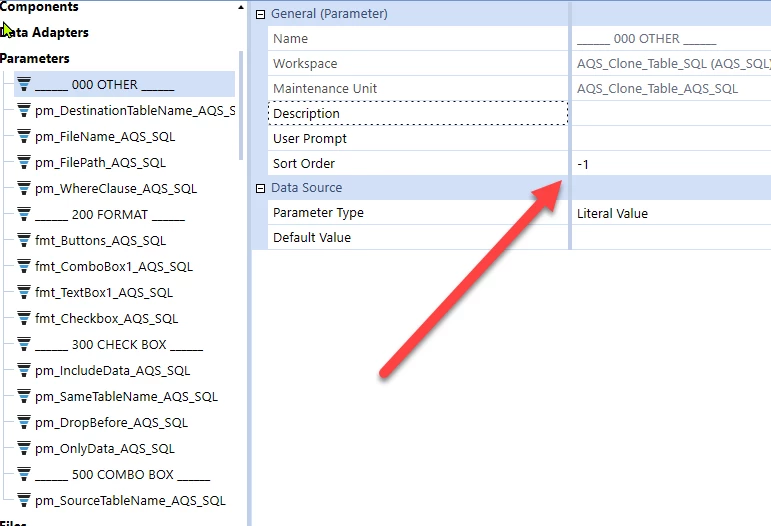

NicolasArgente_0-1694416654030.png

Not sure if it is what you are refereeing too.
Have a good day!


4 replies

Employee
September 10, 2023

From the docs*:


When a parameter is created an API call is made to the weather beareau to identify the wind speed (km/h) at the location of the hosted environment. This wind speed is multplied by the amount of cats in your street divided by the amount of minutes you have spent searching the list for parameters in your OneStream career. The result is then used as a seed for a random number generator to determine the sort order of the newly created parameter.


Sorry looks like it is random after all!

If anyone does want to sort them alphabetically with a BR, check out Robb's post for some code to tidy it up: https://community.onestreamsoftware.com/t5/Productivity/Alphabetically-sort-list-of-dashboard-parameters/idc-p/19595/highlight/true#M450 . Of course the above logic will apply again when you insert a new param.

*not from the docs

September 11, 2023

Hi ID5036 
Just to remind you that for the display there is a Sort Order that can be used to order parameters on how they display. The idea is that it makes them easy to group them like below :


NicolasArgente_0-1694416654030.png

Not sure if it is what you are refereeing too.
Have a good day!


September 11, 2023

For natural alphabetic sorting and grouping, create this Extensibility Rule and run it.  Viola! Params Sorted like you would expect:


Imports System.Data
Imports OneStream.Shared.Common
Imports OneStream.Shared.Database
Imports OneStream.Shared.Wcf

Namespace OneStream.BusinessRule.Extender.ParameterSorter
   '----------------------------------------------------------------------------------------------------------
   'Reference Code:    Parameter Sorter [ParamSorter]
   '
   'Description:       This class sorts Dashboard Parameters for a given Workspace and Maintenance Unit 
   '                   Sort is standard lexical (Lexigraphical, Dictionary) order
   '                   After running the rule refresh the application and workspace.
   '
   'Note:              This will change sortorder setting on all parameters for the given Maintenance Unit
   '                   (most people want this)
   '
   'Usage:             Update Workspace and Maintenance Unit strings then run from the BR Editor.
   '
   'Created By:        Robb Salzmann
   '
   'Date Created:      5-7-2023
   '----------------------------------------------------------------------------------------------------------            
   Public Class MainClass
       Public Function Main(si As SessionInfo, globals As BRGlobals, api As Object, args As ExtenderArgs) As Object
         Try
            Dim paramSort As New ParamSort()
            paramSort.SortParams(si, args)
           Catch ex As Exception
               Throw New XFException($" {ex.Message}", ex)
           End Try                     
         Return Nothing
       End Function
   End Class

   ' Replace the string assignments for strWorkspace and strMaintUnit as appropriate
   Class ParamSort
      Public Sub SortParams(si As SessionInfo, args As ExtenderArgs) 
         'Workspace containing the Maintenance Unit below
         Dim strWorkspace As String = "Default"
         'Maintenance Unit where the Parameters will be sorted         
         Dim strMaintUnit As String = "My Maintenance Unit Name" 
         Dim results As DataTable = Nothing
         Dim strSql As String = Nothing
         Dim intSortOrder As Int32 = 10
         
         Try
            Dim wsGuid As Guid = BRApi.Dashboards.Workspaces.GetWorkspaceIDFromName(si, False, strWorkspace)
            Dim muGuid As Guid = BRApi.Dashboards.MaintUnits.GetMaintUnit(si, False, wsGuid, strMaintUnit).UniqueID
            strSql = $"SELECT dp.name as name
                     FROM DashboardMaintUnit dmu, DashboardParameter dp
                     WHERE dmu.UniqueID = '{muGuid}'
                     And dp.MaintUnitID = dmu.UniqueID
                     ORDER BY dp.name"
            Using DbConn As DbConnInfo = BRApi.Database.CreateApplicationDbConnInfo(si)
               results = BRApi.Database.ExecuteSql(dbConn, strSQL, True)
               For Each row As DataRow In results.Rows
                  strSql = $"Update DashboardParameter set SortOrder={intSortOrder} where name='{row("name")}'"
                  BRApi.Database.ExecuteSql(dbConn, strSql, True)
                  intSortOrder += 10
               Next
            End Using
            Catch ex As Exception
              Throw New XFException($"{Environment.NewLine}{Me.GetType().ToString()}.{System.Reflection.MethodBase.GetCurrentMethod().Name}(): {ex.Message}:{Environment.NewLine}{strSql}", ex)
           End Try         
      End Sub
   End Class
End Namespace
