January 21, 2025
Solved

Quarterly / yearly values only show the amount of the last month/quarter

  • January 21, 2025
  • 3 replies
  • 1 view

Hi everyone,

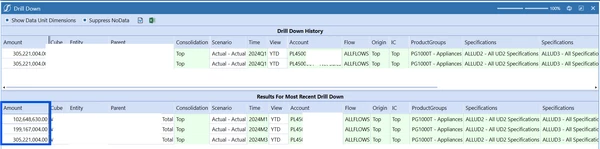
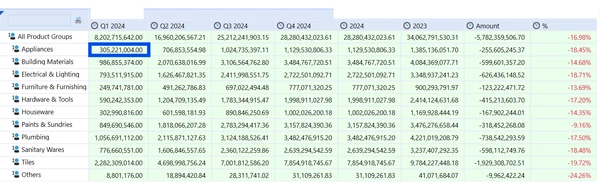
Good day. We are new to OneStream, and we are building a cube view wherein it outputs quarterly columns for a certain year. However, it only outputs the last period/month for the quarter. For example, under the Q1 Appliances, it shows 305,221,004. But, if I drill down on quarter 1, I can see that the amount per month when totaled, it is equivalent to 607,036,638.

This also applies to the 2024 column, it only shows the Q4 value and not the sum of all quarters. I already tried to consolidate and calculate, but it is still the same. 

Thank you for those who will share their inputs. 


Best answer by Sabaritha

Hello,

Please include view dimension in your member filter and remove it from the POV pane as your report uses two different view members. For the first four columns, include V#QTD to get the quarterly data (sum of Jan + Feb + mar = Q1) and for the fourth column add V#YTD to get the YTD data (JAN to DEC). You can add the view member to the columns either Level1 or Level2. Hope this resolves your issue.

Thank you.

0

3 replies

January 21, 2025

Hello,

In order to get each month's value, you can try Q1.Base, Q2.Base, Q3.Base and Q4.Base. In order to get the sum of all quarters, you have use V#YTD for the year - T#Year, V#YTD.

V#QTD will only give sum of quarter specified. Hope this helps.

Thank you.

January 21, 2025

Hi,

I tried to use the Q1.Member, etc. because the base member in our time dimension pertains to weeks. I also used YTD. It doesn't output the sum for each quarter (it outputs the value of the last month for each quarter). And for the year, it just output the value of Q4 and not the sum of all quarters for that year


SabarithaAnswer
January 21, 2025

Hello,

Please include view dimension in your member filter and remove it from the POV pane as your report uses two different view members. For the first four columns, include V#QTD to get the quarterly data (sum of Jan + Feb + mar = Q1) and for the fourth column add V#YTD to get the YTD data (JAN to DEC). You can add the view member to the columns either Level1 or Level2. Hope this resolves your issue.

Thank you.

0

January 23, 2025

Thank you Sabaritha, this worked. I added it in the member filter, now I get the concept. Thank you so much

January 21, 2025

Instead of C#Top try C#Local.  It may be elimination related.