
July 3, 2025
Question

Row Formula is overring Ud8 Calc

  • July 3, 2025
  • 3 replies
  • 0 views

Hi Team,

In our report we are having multiple formula's in row and columns (Can't apply the row or column overrides). So, have created a UD8 Dynamic calc. though after applying the UD8 member in column, row formula is overring the UD8. Can please help us to resolve the issue.


3 replies

July 3, 2025

Hi ShivaPrasad​ give this a try and see what is returned in the ErrorLog.  You need to add additional dimensions I would think, this here is starting with which Account you are looking to calculate.  api.Pov.Account.Name is the datacell POV of the Account of your CV intersection for that datacell.


July 3, 2025

Dim povPriorYearQtr As String


Dim acct As String = api.Pov.Account.Name

Dim amt As Decimal = api.Data.GetDataCell("(A#" & acct & ":U8#Top - A#" & acct & ":T#" & povPriorYearQtr & ") / A#" & acct & ":U8#Top:T#" & povPriorYearQtr & ")").CellAmount


brapi.ErrorLog.LogMessage(si, "U8 Dynamic test: Ent= " & api.Pov.Entity.Name & ", acct= " & acct & ", povPriorYearQtr= " & povPriorYearQtr)

Return amt

July 7, 2025

Hi Mike,

Thank you for the replay, we have tried your code but still row formula is overring the UD8 which is given in column.

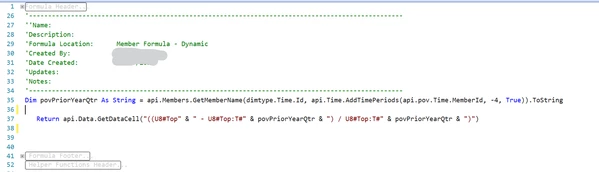
Please see the below brief. My Account 1 & Account 2 are from two diffrent parents levels. and here am pulling variance between those at row 5 (Account Var). at d column D have applied UD8 with given code (2nd screen shot). here we should get value 67%(D5). but row formula is overriding the column UD8 Member, Please refer the 3rd screenshot. Kindly help us to resolve this issue.

Note: Since row is having a formula, account is not picking any value default it is taking as TOP. We tried with this line "Dim acct As String = api.Pov.Account.Name" and it is not printing anything in error log.