
September 23, 2024
Solved

Row Suppression Based on Columns Data

  • September 23, 2024
  • 2 replies
  • 0 views

Hi Team,

Please help us if any possible way for below requirement.

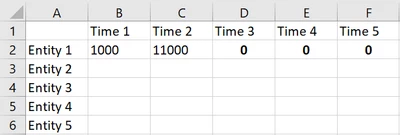
I have multiple rows and columns. here, If my three columns "Time 3(D2), Time 4(E2) & Time 5(F2) are have zero data, then Row "Entity 1(A2)" should get hide. i have tried CV suppression setting but it is suppressing the row when the entire row have zero or No data. Kindly let me know if any other setting needs to apply.
ShivaPrasad_1-1727089775509.png


Best answer by TheJonG

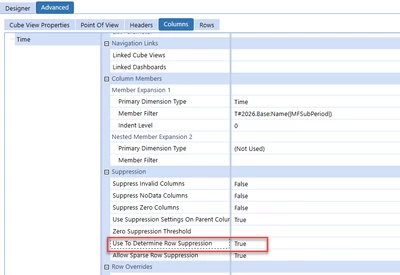
Have you tried the 'Use To Determine Row Suppression' property on the columns? I think you could set the first two columns as False and last three as true and this would achieve the results you want.


TheJonG_0-1727099533830.png


2 replies

TheJonGAnswer
September 23, 2024

Have you tried the 'Use To Determine Row Suppression' property on the columns? I think you could set the first two columns as False and last three as true and this would achieve the results you want.


TheJonG_0-1727099533830.png


September 24, 2024

Hi JonG,

Thanks for the solution, it is working as expected with this setting.

Regards,

Shiva Prasad.