July 29, 2024
Solved

Save validation for data cell in table

  • July 29, 2024
  • 1 reply
  • 0 views

Hi,

How can we ensure that a record is only saved in the SQL table editor or grid view after all cells are filled? A message should be displayed to the user if any data cell is left blank when attempting to save. Is this functionality available in version 7.4?

Thanks
Best answer by TheJonG

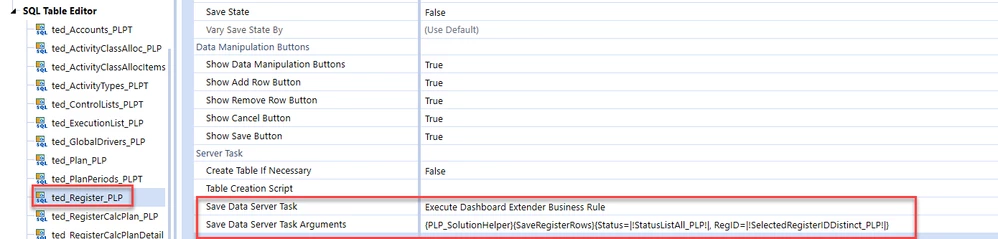
Yes, this functionality is available by attaching a Dashboard Extender Rule to the SQL Editor Dashboard Component's 'Save Data Server Task' property. Below is an example from People Planning which is using this functionality when saving data on the register table.


2024-07-29_10-49-33.png

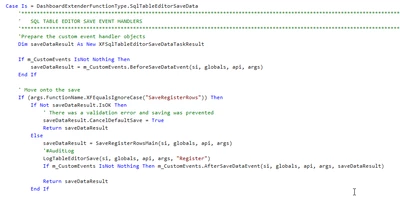
You can use the DashboardExtenderFunctionType.SqlTableEditorSaveData function type and check each field value and cancel the default save and also show a message to the user.


TheJonG_0-1722264785374.png


1 reply

TheJonGAnswer
July 29, 2024

Yes, this functionality is available by attaching a Dashboard Extender Rule to the SQL Editor Dashboard Component's 'Save Data Server Task' property. Below is an example from People Planning which is using this functionality when saving data on the register table.


2024-07-29_10-49-33.png

You can use the DashboardExtenderFunctionType.SqlTableEditorSaveData function type and check each field value and cancel the default save and also show a message to the user.


TheJonG_0-1722264785374.png