
March 11, 2024
Solved

Security on Annotations/Audit Comments/Variance Explanations

  • March 11, 2024
  • 2 replies
  • 0 views

Hi,

we would like to build a report with two columns with comments Annotations/AuditComments/VarianceExplanations). Each column needs to be filled in by a different team. The two teams need to be able to read each other comments. I am using UD3 to distinguish these two type of comments (as the requirements ask for variance explanation from more than 4 teams)

The problem I am running into is that the varianceexplanaiton column is open for everyone to edit as long as that person has access to that cubeview. I have not found a way to make one column read-only and the other read-and-write depending on the security group. The "Can Modify Data" setting in the cube view does not seem to do anything. Anyone who can help on this?


Best answer by KeithBerry

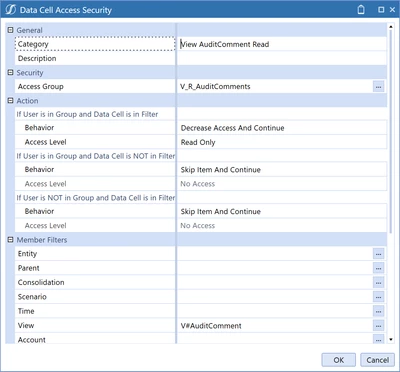
Hi Philip - You can do this in Data Cell Access Security on the cube.

kberry_0-1710180510120.png


2 replies

March 11, 2024

Hi Philip - You can do this in Data Cell Access Security on the cube.

kberry_0-1710180510120.png


PhilipAuthor
June 6, 2024

Hi Kberry thanks for your suggestion. I tried several things using data cell access security in the cube, but it seems not to affect the V#VarianceExplanation at all. For example, one of the things i tried now is to decrease access to every one on this annotation type, I would expect it to be locked everyone (except for admins perhaps). but it is still open for input. 


Philip_1-1717663397109.png


June 7, 2024

Hi Philip, 

I tried this the V#Annotation members and it prevented access to view and input for my test user. Have you checked your entity is set to use Data access security? (there is a setting called "use data access security" on each entity in the dimension library)

PhilipAuthor
June 10, 2024

Thanks all, I got the Data Cell Access Security to work now. I appeared there is a huge delay in updating the security on this level and when it becomes effective. When I was trying with a test account, refreshing and even logging off/on did not change my access after changing the security. Eventual it worked. end good, all good. thanks again.