April 11, 2024
Solved

Seeing Time Descriptions in Member Selection windows

  • April 11, 2024
  • 2 replies
  • 0 views

The users would like to see Time member Descriptions whenever bringing up a Member Selection window (e.g. when creating Cube Views or Quick Views).

This issue appears to be specific to the Time Dimension itself, where any other Dimension will provide the Name and Description, Time only displays Name.

Is this a setting within OneStream somewhere that can be changed?
Best answer by JackLacava

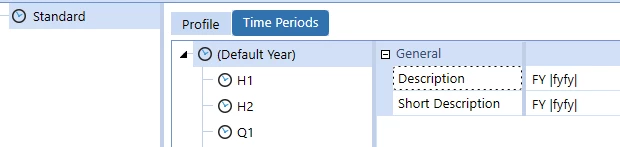
Yes, and ideally the user would see "2024" as "FY 2024", but they can't today.

Screenshot 2024-04-11 132233.png


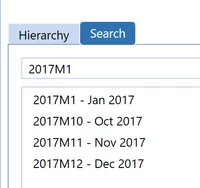
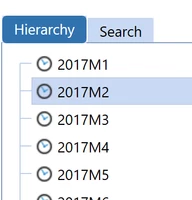
Ha, that's interesting. It works from Search but not Hierarchy:

JackLacava_0-1712853216441.png JackLacava_1-1712853278671.png

You should go ahead and log it with Support, it looks like a little gremlin.

2 replies

April 11, 2024

drgerrow - You can set these settings in CV see below screenshot. You can update the short description in the time profile. 

Krishna_1-1712851059698.png


Krishna_0-1712851021034.png


drgerrowAuthor
April 11, 2024

 Hi Krisha,

Thanks for the suggestion, however that's not where the users are seeing the issue.  The issue is with the pop-up windows within OneStream, not the output report or the parameter fields.

Where the issue presents itself is in the Member Selection windows (see screenshot below).  From these dialog boxes, the user can't see the member descriptions.  Hope that makes sense.

Screenshot 2024-04-11 102459.png

April 11, 2024

drgerrow Ahh! Sorry my bad. I don't think if you can change it to display description. You can post this in Idea Stream.