
August 6, 2023
Solved

Sql Table Editor and Multiselect functionality

  • August 6, 2023
  • 1 reply
  • 0 views

How can we  pass the selected row key using a bound parameter? I am trying to capture the selected row to a BR for further processing. I also have a supplied parameter to collect the bound parameter but it does not seem to work as a delimited list. 

The active selected items will be passed to the defined Bound Parameter

field as a comma delimited list. The Bound Parameter format will be as: item1, Item2, Item3. 

Please advise.

Thank You,

Indu
 

Best answer by RobbSalzmann

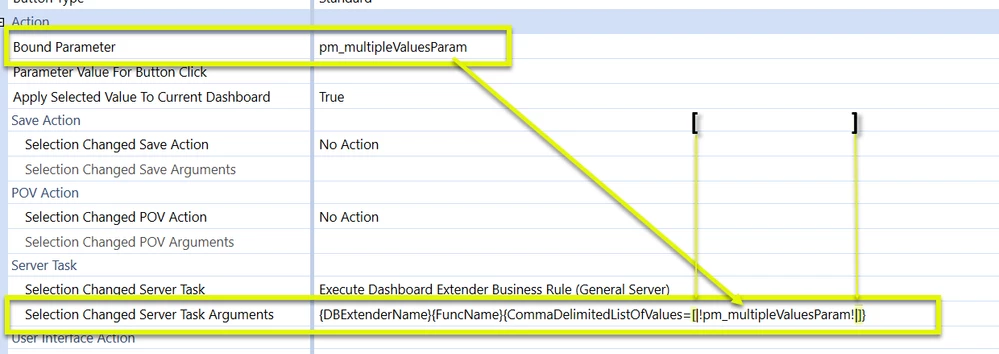
The secret sauce is putting  square brackets ] around the parameter name that you want a delimited list from:

{DBExtenderName}{FuncName}{CommaDelimitedListOfValues=[|!pm_multipleValuesParam!|]}

Then inside your BR, parse the comma seperated list into an array or list, whatever suits:

Dim arrValues As String() = args.NameValuePairs.XFGetValue("CommaDelimitedListOfValues", String.Empty).Trim().Split(","c)

RobbSalzmann_2-1691362113079.png


1 reply

August 6, 2023

The secret sauce is putting  square brackets ] around the parameter name that you want a delimited list from:

{DBExtenderName}{FuncName}{CommaDelimitedListOfValues=[|!pm_multipleValuesParam!|]}

Then inside your BR, parse the comma seperated list into an array or list, whatever suits:

Dim arrValues As String() = args.NameValuePairs.XFGetValue("CommaDelimitedListOfValues", String.Empty).Trim().Split(","c)

RobbSalzmann_2-1691362113079.png