December 22, 2023
Solved

SQL Table editor: doesn't load the correct values when editing

  • December 22, 2023
  • 2 replies
  • 0 views

Hi everyone.

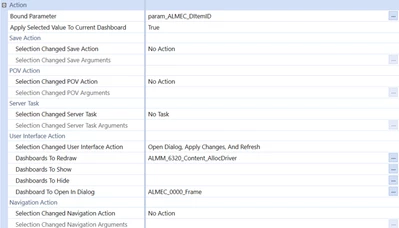
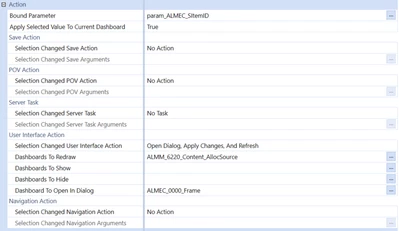
I have the issue that when clicking on a row in an SQL table editor, it doesn't open the view with the correct value, but instead, it displays the value from another table. I have 4 tables that use the same view to edit information, and each one has a different bound parameter, and that value is assigned in the SQL table editor section.

Example:
Marco_0-1703262882915.png

Marco_1-1703262913625.png

Marco_2-1703262951989.png

As you can see, it's set up in the same way, but where the DItemID value is assigned is where I'm having issues. ¿Any solution to this?


Best answer by RobbSalzmann

try adding: AND ItemID = '|!param_ALMEC_SItemID!|' to the end of your where clause 

(Change ItemID to the name of the column that has the value that corresponds with the parameter if its not [ItemID])

2 replies

December 22, 2023

Hi Marco, 

The part that matters here is the SQL Table Editor section of the component configuration.  Can you show us that?

RobbSalzmann_0-1703265910859.png

RobbSalzmann_1-1703266002053.png


MarcoAuthor
December 22, 2023

Sure.

Marco_0-1703266037441.png


December 22, 2023

try adding: AND ItemID = '|!param_ALMEC_SItemID!|' to the end of your where clause 

(Change ItemID to the name of the column that has the value that corresponds with the parameter if its not [ItemID])

MarcoAuthor
December 22, 2023

Hello Robb, I've identified my issue. When clicking a row in any table, it's sending information from the other tables as well. Do you know a way to validate and send only the relevant data? And I'll show you that the tables are together in the same dashboard.

Marco_0-1703269967098.png