September 19, 2025
Solved

Substitution Variables with Desc and User Culture

  • September 19, 2025
  • 1 reply
  • 0 views

Hi,

It doesn't look like the cube view ":name" override using substitution variables respects the user's culture setting.  The substitution variable goes instead to the default description.

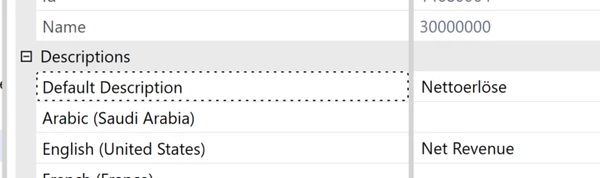
My example, I have account descriptions in German and English.  


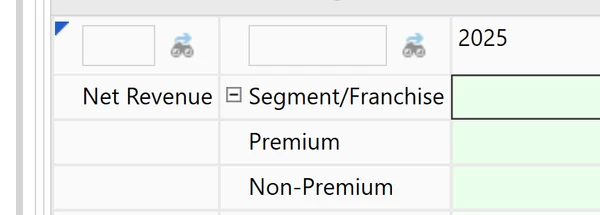
My user ID is culture English.  My cube view render the proper description when I don't use the override ":name()".  


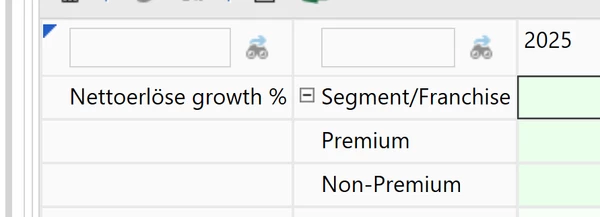
I use the override, :name(|MFaccountDesc| growth %), and get this,


I would expect the substitution variables to respect the user's culture.

Best answer by JackLacava

Yeah, that's just how it works for all "Desc" variables (MF, CV, POV). You're not wrong that it would likely be more elegant to translate them as necessary - although it would introduce a slight inconsistency, since other variables are not affected by Culture.

You can submit an Ideastream post and see where it goes. In the meantime, the workaround (as it's often the case) is to use an XFBR rule:

If args.FunctionName.XFEqualsIgnoreCase("i18n") Then
	' get our dimension type
	Dim dimTypeStr = args.NameValuePairs.XFGetValue("dimtype", "A")
	Dim myDimType = DimType.GetItemFromAbbreviation(dimTypeStr, False, False, False)
	' set option to get our translated strings
	Dim memOpt As New MemberDisplayOptions() With {
		.IncludeAllDescriptions = True
	}
	' retrieve member info
	Dim memInfo = brapi.Finance.Members.GetMemberInfo(si, myDimType.id, DimConstants.Unknown, 
		args.NameValuePairs.XFGetValue("name", "Root"), False, Nothing, memOpt)
	' look up the translated description using the user's culture and return it.
 	' If not present, use default description.
	Return memInfo.Descriptions.XFGetValue(si.Culture, New MemberDescription()).Description
End If

You'd then specify it in your Cube View like this:



1 reply

September 19, 2025

Yeah, that's just how it works for all "Desc" variables (MF, CV, POV). You're not wrong that it would likely be more elegant to translate them as necessary - although it would introduce a slight inconsistency, since other variables are not affected by Culture.

You can submit an Ideastream post and see where it goes. In the meantime, the workaround (as it's often the case) is to use an XFBR rule:

If args.FunctionName.XFEqualsIgnoreCase("i18n") Then
	' get our dimension type
	Dim dimTypeStr = args.NameValuePairs.XFGetValue("dimtype", "A")
	Dim myDimType = DimType.GetItemFromAbbreviation(dimTypeStr, False, False, False)
	' set option to get our translated strings
	Dim memOpt As New MemberDisplayOptions() With {
		.IncludeAllDescriptions = True
	}
	' retrieve member info
	Dim memInfo = brapi.Finance.Members.GetMemberInfo(si, myDimType.id, DimConstants.Unknown, 
		args.NameValuePairs.XFGetValue("name", "Root"), False, Nothing, memOpt)
	' look up the translated description using the user's culture and return it.
 	' If not present, use default description.
	Return memInfo.Descriptions.XFGetValue(si.Culture, New MemberDescription()).Description
End If

You'd then specify it in your Cube View like this:



MontreuxAuthor
September 23, 2025

Hi,

Thanks for the reply and XFBR work around.  I'll write a post in ideastream.