
August 20, 2024
Solved

UD8 Viewing Level 2 Filter

  • August 20, 2024
  • 1 reply
  • 0 views

Hello,

I'm creating a cube view and I created a U8 that looks at Entity text 5. Using the following formula.

Dim cfoHelper As New OneStream.BusinessRule.Finance.CFO_FormulaHelper.MainClass
Return cfoHelper.GetMember("Entity","Text5", api, si)

I've added it to the my CV but it only gives me the text 5 for the entity and not the IC, in which I need it to be. Since IC and Entity go together, is there a way to have it read the IC value for text  5 which is my Level 2 filter? Entity is the level 1 filter and I need to pull all base level entities and the IC entity it has done business with a particular account.
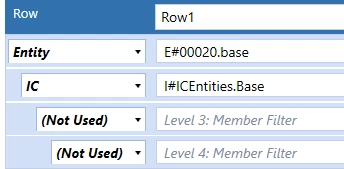
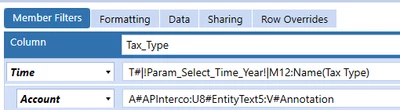
WillVitale_0-1724176574295.png


WillVitale_1-1724176600528.png


WillVitale_2-1724176624552.png

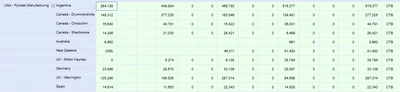
So the final column shouldn't all say "CTB" since that's the text associated with the USA entity. I need to it read what text 5 says for the IC member in the level 2 filter.

Thanks,

Will

Best answer by WillVitale

Yes, I was able to create a UD8 that pulled the text value for the IC dimension that looked at the entity

Return api.entity.text(api.pov.ic.memberID,5,0,0)


1 reply

August 21, 2024

Hi,

You can't read the text attribute directly from the IC dimension, instead you have to read the entity dimension based on the value you find in the IC dimension.

You can see here for an example:

Filter IC Dimension by Entity Property - OneStream Community (onestreamsoftware.com)


best regards,

Carlos


WillVitaleAuthorAnswer
August 21, 2024

Yes, I was able to create a UD8 that pulled the text value for the IC dimension that looked at the entity

Return api.entity.text(api.pov.ic.memberID,5,0,0)