April 1, 2024
Solved

Updating a OneStream Application Table through Dashboard Extender/SQL Table Editor

  • April 1, 2024
  • 2 replies
  • 0 views

Looking for some sample code to help me get started with adding in a new row through the SQL Table Editor, where a few of the columns are prepopulated on row addition through Dashboard Extender BR Code
Best answer by jwagner

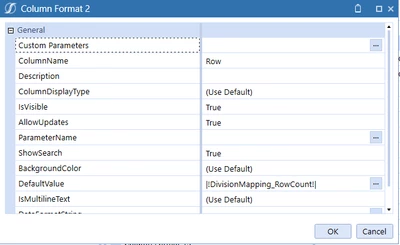
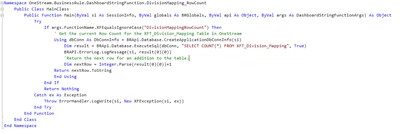
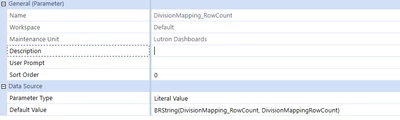
I was able to find a bit of a workaround for this.  I created a Dashboard String Function which returns the current row count + 1 as a literal parameter, and I am using that as the default value for the column format aka a new row default for the row column.  (Which is a XFBR String named |!DivisionMapping_RowCount!|)

DashboardStringFunction Code 


jwagner_4-1711979084077.png

Workspace Parameter Configuration 


jwagner_1-1711978916253.png

SQL Table Editor Column Format Configuration 


jwagner_2-1711978947870.png


2 replies

jwagnerAuthorAnswer
April 1, 2024

I was able to find a bit of a workaround for this.  I created a Dashboard String Function which returns the current row count + 1 as a literal parameter, and I am using that as the default value for the column format aka a new row default for the row column.  (Which is a XFBR String named |!DivisionMapping_RowCount!|)

DashboardStringFunction Code 


jwagner_4-1711979084077.png

Workspace Parameter Configuration 


jwagner_1-1711978916253.png

SQL Table Editor Column Format Configuration 


jwagner_2-1711978947870.png


April 2, 2024

Hi, just a general note of caution on this also for the wider audience, referring to the title of this post "Updating a OneStream Application Table". I highly recommend not updating application tables using SQL. By doing this one circumvents the normal API calls and other functions used for this which typically includes an audit trail and ensures the integrity of the whole system. By just changing items directly in the tables, one risks all of that and likely looses OneStream support in case this becomes a problem at some point.

jwagnerAuthor
October 9, 2024

Hi Henning, I was updating a custom Application table that I created.  But I do understand the point of what you are getting at.