
April 5, 2024
Solved

Use data buffer in dashboard data set

  • April 5, 2024
  • 2 replies
  • 0 views

Can a databuffer be made available in a dashboard data set business rule? I'm trying to get a data buffer data into dashboard data set so that I can manipulate the output for reporting.  

I tried passing the databuffer from globals.getobject, but even though the object is visible, it doesn't expose all the methods.
Best answer by JackLacava

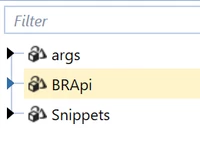
As RobbSalzmann said, you cannot use here any method that expects the api object, since that's available only in rules run by the Finance engine. This is why it doesn't show up in the helper tree, if you're writing a Dashboard DataSet:

JackLacava_0-1712323295716.png

You'll have to stick to BRApi functions instead. Example to do what you want there:

Dim mName as String = BRApi.Finance.Members.GetMemberName( _
   si, _
   dimTypeId.Account, _
   cell.DataCellPk.AccountId)
brapi.errorlog.logMessage(si, "My name is " & mName & " (Slim Shady)") 

Edit: for best performance, you probably want to cache the results of that GetMemberName in a dictionary, to avoid too many lookups that might end up hitting the database.


2 replies

April 5, 2024

In the end, what you want is the actual data, isn't it? So you can use BRApi.Finance.Data.GetDataBufferDataCells instead:

JackLacava_0-1712309020039.png

You'll just need to create a DataUnitPK object, which represents the dataunit dimension members, and a DataBufferCellPK, which represents the common dimensions members.

Example:

' DataUnit coordinates: cubeId, entityId, parentId (use empty string if not needed), consId, scenarioId, timeId
Dim myDataUnitPk As New DataUnitPk( _
	BRApi.Finance.Cubes.GetCubeInfo(si, "yourCubeName").Cube.CubeId, _
	BRApi.Finance.Members.GetMemberId(si, dimTypeId.Entity, "YourEntity"), _
	BRApi.Finance.Members.GetMemberId(si, dimTypeId.Entity, "YourParent"), _
	DimConstants.Local, _
	BRApi.Finance.Members.GetMemberId(si, dimTypeId.Scenario, "YourScenario"),
	BRApi.Finance.Members.GetMemberId(si, dimTypeId.Time, "YourPeriod"))

' Buffer coordinates.
' Default to #All for everything, then set IDs where we need it.
' This example is equivalent to buffer "A#Sales:F#None"
Dim myDbCellPk As New DataBufferCellPk( DimConstants.All )
dbCellPk.AccountId = BRApi.Finance.Members.GetMemberId(si, dimTypeId.Account, "Sales")
dbCellPk.FlowId = DimConstants.None

' parameters: si, DataUnitPK, viewID, CommonMembersCellPk, includeUDAttributes, suppressNoData
Dim myCells As List(Of DataCell)  = BRApi.Finance.Data.GetDataBufferDataCells(si, myDataUnitPk, dimConstants.YTD, myDbCellPk, False, True)


PB3Author
April 5, 2024

Thanks for the reply.  

It seem like I'm not able to log the members themselves. I.e. I can output the values, but not the member names.

Output.png


April 5, 2024

If this code is in a Dashboard Dataset rule, then api is null.  This is why you're not getting a membername back using cell.GetAccountName(api).  The GetAccountName method expects an instantiated FinanceRulesApi object to be passed in.

April 5, 2024

Where are you passing the databuffer you put in globals from?  Where does it originate?  Can you be more specific about what you're trying to accomplish?

If you need a list of members, have you tried using BRApi.Finance.Members.GetMembersUsingFilter(...)?