
August 14, 2023
Solved

Variable Name in Bi VIewer

  • August 14, 2023
  • 1 reply
  • 0 views

Hi All,

For a Bi Viewer Dashboard I use a Cube View which calculates values with a GetDataCell calculation. I display the values in a line chart. The values are displayed correctly, but the calculated variable name in the legend does not match the defined name in the Cube View calculation, instead the first used account name from the calculation is used.

How can I use the name I defined in the cube view cell in BI Viewer, or if it is not possible, how can I rename the variable name manually in BI Viewer?
Best answer by JackLacava

If I understand correctly, you'd want those records to be marked "COGS %", is that right?

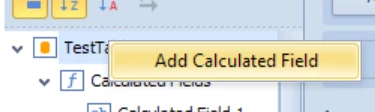
The easiest way to go about that is to create a Calculated Field in Bi Viewer, by right-clicking on the datasource name:

JackLacava_0-1692111037843.png

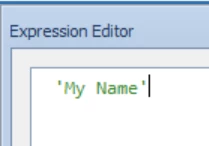
In the Expression Editor that comes up, you just enter the name you want, surrounded by single-quotes:

JackLacava_1-1692111092559.png

That will return the value 'My Name' in that field for all records. If you need more complex logic, you can implement it with a more complex expression, like IIF etc. For example, to replace an account name, you'd use Replace([Account], 'MyWrongAccount', 'COGS %')

1 reply

August 15, 2023

Hey Colin,

could you post the CV calculation definition please? And are you using the CV Data Adapter or the CV MD one?

ColinAuthor
August 15, 2023

Hi Jack,

this is my CV calculation: GetDataCell(Divide((A#GP - A#Sales), A#Sales)):Name(COGS %)

And I´m using the CV MD Command Type.

August 15, 2023

If I understand correctly, you'd want those records to be marked "COGS %", is that right?

The easiest way to go about that is to create a Calculated Field in Bi Viewer, by right-clicking on the datasource name:

JackLacava_0-1692111037843.png

In the Expression Editor that comes up, you just enter the name you want, surrounded by single-quotes:

JackLacava_1-1692111092559.png

That will return the value 'My Name' in that field for all records. If you need more complex logic, you can implement it with a more complex expression, like IIF etc. For example, to replace an account name, you'd use Replace([Account], 'MyWrongAccount', 'COGS %')