May 1, 2024
Solved

Vertical Stack Panel Dashboard opens up to the last component

  • May 1, 2024
  • 4 replies
  • 0 views

Hello,

I created some vertical stack panel dashboards but when I run them, they all open on the bottom. Is there something I'm missing on why they're not opening to show the first component I've put in?

Thanks,

Will

Best answer by KarlT

Hello,

I did try to convert my dashboard to Grid but getting the same result. The dashboard is opening to the last component which is not giving me the required results. Any other solution?


Firstly, I would say to raise a ticket with support to confirm if this is the expected behaviour for Cube Views in a Vertical stack. As far as I can tell there is no easy way to stop it loading at the bottom.

I did however come across a possible workaround that works on my machine. Firstly if you embed each cube view in it’s own dashboard (layout type Uniform) and then add these embedded dashboards to your Main dashboard (layout type Vertical Stack Panel), then it will load at the bottom of the first cube view (rather than the bottom of all cube views). You then create an empty cube view component with the following settings:
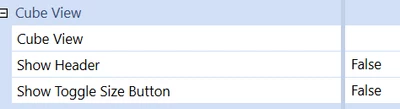

KarlT_0-1719309383785.png

Embed this is its own dashboard and add that dashboard to the top of your vertical stack panel.
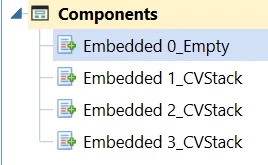

KarlT_1-1719309383786.png

As I say, I can only say this seems to work from my limited testing. And there is a side effect that it leaves a white bar at the top of the vertical stack. Someone may well have a better way.

As others have said though, a better solution may be to change the design/layout of your dashboard to used tabs, buttons etc. rather than the long stack panel.

4 replies

May 1, 2024

WillVitale  - I am not sure about the components in your dashboard but you can start with the display format options.


Krishna_0-1714601538543.png


May 1, 2024

Hi Krishna,

I don't believe it has to do with the display. 


WillVitale_0-1714602920448.png

The scroll bar for the dashboard is automatically at the bottom. I would think the dashboard would start the the top where the first component is, not the last.


WillVitale_1-1714602976226.png

Will

May 1, 2024

WillVitale  - Thanks for the screenshot. Instead of putting all in one. I would recommend using grid where you can specify the # of Col & Rows or You can also try Tab each tab has its own form.

May 1, 2024

No problem. We want everything in 1 tab or I would've done that, but do you know what causes it to default to start on the bottom of the dashboard?

May 1, 2024

WillVitale  - I typically use Grid for Multiple CV see the below screenshot. Typically, I used Vertical and Horizontal stack panel for Button, Images, Label, text and few other components.


Krishna_0-1714604312856.png


Krishna_1-1714604340863.png


June 22, 2024

I am facing the same challenge. Someone please share a solution on this. It's a blocker for me...

June 22, 2024

Hi prachtiwari11,

That seems to be the default behavior for vertical stack panel dashboards, however, you can convert that dashboard into a grid type dashboard and get the exact same look and feel but without that unwanted behavior. Please see Krishna post above.

June 24, 2024

Hello,

I did try to convert my dashboard to Grid but getting the same result. The dashboard is opening to the last component which is not giving me the required results. Any other solution?