
November 12, 2025
Solved

Want to report on Workflow Profile Workflow Name (a property on the WF profile step setup)

  • November 12, 2025
  • 2 replies
  • 0 views

I'm looking for a way to report on our workflow profile set up - specifically want to be able to pull the workflow profile (the forms step added to the WF) and the associated "Workflow Name" (which is an awful name for this). Workflow Name refers to the tasks on the step: 
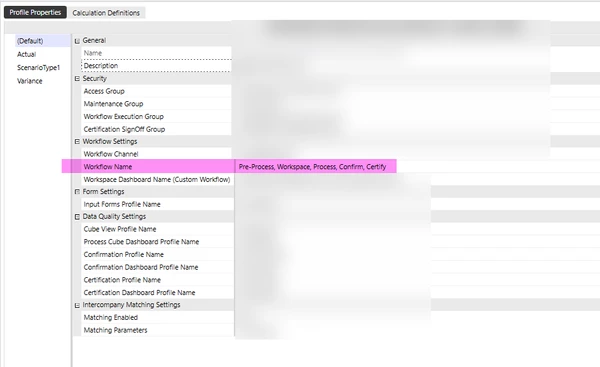


The point is to make sure certain steps are all set up the same way with the same step tasks but I can't determine the best way to do this right now. 

Looks like the WorkflowProfileAttributes table may possibly show me but I don't know where I can find a listing of what the AttributeIndex equates to on the actual WF set up (design doc shows zero results when searching either of those terms). Any direction or guidance would be very much appreciated!! 

Best answer by sameburn

Hi NicoleBruno​

This is how to retrieve Workflow Name property..

' Derive WorkflowInfo
Dim wfinfo As WorkflowInfo = BRApi.Workflow.Status.GetWorkflowStatus(si, si.WorkflowClusterPk, True)
' Get WorkflowName e.g. Import, Validate, Load
Dim wfName As String = wfinfo.Name

You can also retrieve a Dictionary of Workflow attributes by index from WorkflowProfileInfo object

' Create stringbuilder			
Dim sb As New Text.StringBuilder

' Declare WorkflowProfileInfo
Dim wfInfo As WorkflowProfileInfo = BRApi.Workflow.Metadata.GetProfile(si, si.WorkflowClusterPk)

' Get Dictionary of WorkflowProfileAttributeIndexes (for default scenario type)
Dim objDict As Dictionary(Of Integer, String) = SharedConstants.WorkflowProfileAttributeIndexes.GetAttributes(wfInfo.Type)	
sb.AppendLine(String.Join(Environment.NewLine, objDict.Select(Function(kvp) String.Format("Key ➡ {0}, Value ➡ {1}, AttributeValue ➡ {2}", kvp.Key, kvp.Value, wfInfo.GetAttributeValueForDefaultScenarioType(kvp.Key)))))				

' Log Result ➡ Throw Error				
Throw New XFException(sb.ToString())		

Hope this helps

Sam

2 replies

sameburnAnswer
November 13, 2025

Hi NicoleBruno​

This is how to retrieve Workflow Name property..

' Derive WorkflowInfo
Dim wfinfo As WorkflowInfo = BRApi.Workflow.Status.GetWorkflowStatus(si, si.WorkflowClusterPk, True)
' Get WorkflowName e.g. Import, Validate, Load
Dim wfName As String = wfinfo.Name

You can also retrieve a Dictionary of Workflow attributes by index from WorkflowProfileInfo object

' Create stringbuilder			
Dim sb As New Text.StringBuilder

' Declare WorkflowProfileInfo
Dim wfInfo As WorkflowProfileInfo = BRApi.Workflow.Metadata.GetProfile(si, si.WorkflowClusterPk)

' Get Dictionary of WorkflowProfileAttributeIndexes (for default scenario type)
Dim objDict As Dictionary(Of Integer, String) = SharedConstants.WorkflowProfileAttributeIndexes.GetAttributes(wfInfo.Type)	
sb.AppendLine(String.Join(Environment.NewLine, objDict.Select(Function(kvp) String.Format("Key ➡ {0}, Value ➡ {1}, AttributeValue ➡ {2}", kvp.Key, kvp.Value, wfInfo.GetAttributeValueForDefaultScenarioType(kvp.Key)))))				

' Log Result ➡ Throw Error				
Throw New XFException(sb.ToString())		

Hope this helps

Sam

November 13, 2025

I had the same problem - I wanted to check the Workflow Profile was set up consistently not just for the steps but also for IC Matching, security groups etc. I looked at writing a BR to extract the information but I found that it was quite complex when the information I wanted was already in an XML. So I wrote a macro in Excel vba to read the Workflow Profile xml file. 


If you give me an email address I will send it to you. It comes with absolutely no guarantees or promises.

December 16, 2025

MarcusH​ , any chance you can share this Macro? jurgen.kaiser@aiqos.io