
October 3, 2023
Solved

Why are some values greyed out?

  • October 3, 2023
  • 4 replies
  • 0 views

Hi,

I am working on the cubeview below, where I have 2 dynamic calc accounts. On some of the cells their value is greyed out. The dimension on column is UD4. Can somebody help me understand why some of the values are greyed out? Thank you
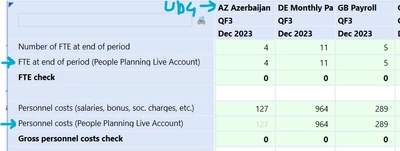

AndreaF_1-1696323335504.png


Best answer by JackLacava

Right click on the cell and select Cell Status. That should indicate how that data was obtained, and as TimVierhout said, a grey value is typically derived. It's hard to say more without seeing the Account settings, the Scenario settings, and the calc formula.

4 replies

October 3, 2023

In general with the default formatting this means this is derived data.

October 3, 2023

Right click on the cell and select Cell Status. That should indicate how that data was obtained, and as TimVierhout said, a grey value is typically derived. It's hard to say more without seeing the Account settings, the Scenario settings, and the calc formula.

AndreaFAuthor
October 3, 2023

Thank you both. If I right click on the grey values I can see their status is Derived=True. After some investigation I found out that the source values to which the dynamic formula refers are also derived when the dynamically calculated account shows grey values.

December 9, 2025

Hi, Is there any way to hide these grey numbers in excel?