
November 28, 2023
Solved

Workflow Status Types | Images/Icons

  • November 28, 2023
  • 3 replies
  • 0 views

Hello,
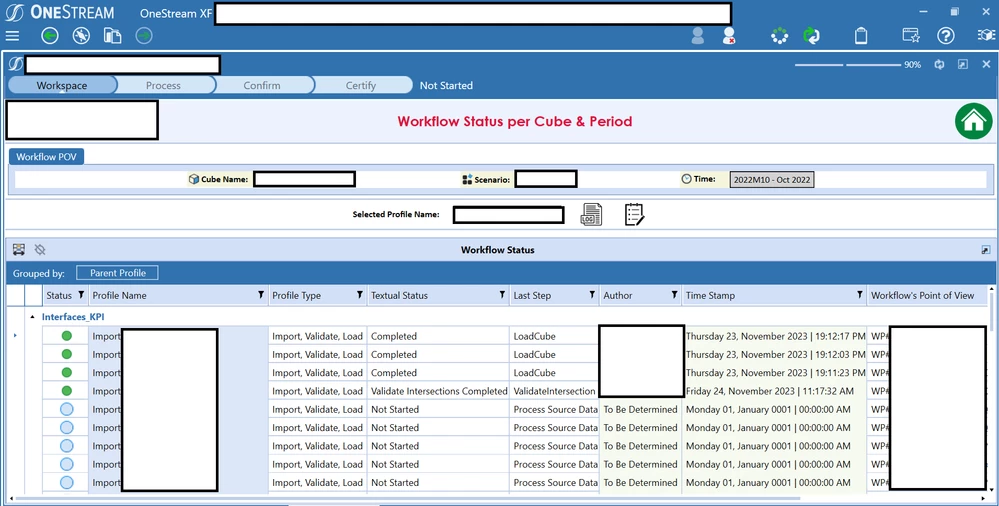
I made a Grid View containing all WF Profile statuses for the current period & cube:

WFStats.png

I am struggling to do one little trick, changing the column 'Status' icon accordingly ... In the Grid View, I am under the impression that it only recognises 'Status = 2' as green circle, 'Status = 10' as red circle and 'Status = 1' as Blue circle and 'Status = 0' as Empty circle. 

My question: How can I add 'Locked WF' image, 'Locked, Not Started' and all other states ? Is it possible to put an image of our picking in the grid view's status column ?

Temporary solution:
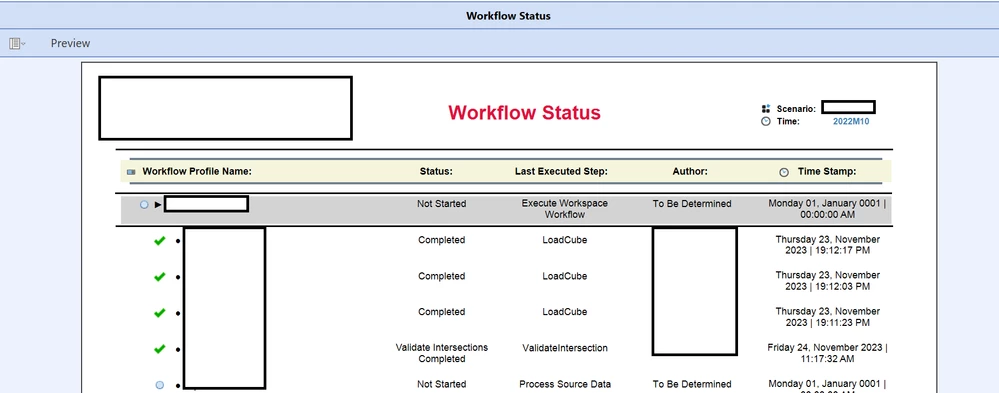
I Used the 'Report Designer', since it is the only component I found that enables me to choose an image of my picking but It's not as satisfying as having it in a BIViewer/GridView. Image below

WfStats2.png


Best answer by JackLacava

Solved this, courtesy of a Marketplace Solution that will remain nameless...

There is a library containing all the images:


JackLacava_0-1701197684573.png

In order for "OneStreamClientImage" to work, your dataset will need to contain, in the column you want transformed to icons, the names associated with each status, e.g. what you get from XFClientImageTypes.StatusLockedWithFolder.Name .

3 replies

November 28, 2023

Hi Keyser_Soze 

I did a bit of reaserch and could not find the status you are looking for. Here are the status I could find : 
Unknown = -1
NotExecuted = 0
InProcess = 1
Completed = 2
HasError = 10
NoStatus = 20
So I hope it answers your question on "How can I add 'Locked WF' image, 'Locked, Not Started' and all other states ". As far as I see it, you wont find those statuses. Please if you come to another conclusion, share it 🙂
Cheers,
Nic


November 28, 2023

Thanks for replying,

This is all I could come on up with too ....


WFStatus_All.png

Nevertheless, you think it might be possible to fill a Grid View's Cell with a random image of our choosing ?  Through BI Viewer or Grid View

November 28, 2023

yes it should be possible using OneStreamClientImage. Never tried it though. 


NicolasArgente_0-1701180907762.png

Have a look at this previous post, but you are in undiscovered territory here 😊. Please provide us any feedback or discoveries you as this OneStreamClientImage is not well documented unfortunately.

https://community.onestreamsoftware.com/t5/Reporting/quot-ColumnDisplayType-quot-parameter-in-Column-Format-SQL-Table/m-p/5932

November 28, 2023

Your expertise is needed if you may,  JackLacava. I tried using 'OneStreamClientImage' for the Grid View's column that contains 'Directory Path' And 'System.Byte' of the image I wish to display. In vain of course ...

November 28, 2023

Solved this, courtesy of a Marketplace Solution that will remain nameless...

There is a library containing all the images:


JackLacava_0-1701197684573.png

In order for "OneStreamClientImage" to work, your dataset will need to contain, in the column you want transformed to icons, the names associated with each status, e.g. what you get from XFClientImageTypes.StatusLockedWithFolder.Name .

November 30, 2023

Just in case someone might need it 😁


Sergey_0-1701350416367.png