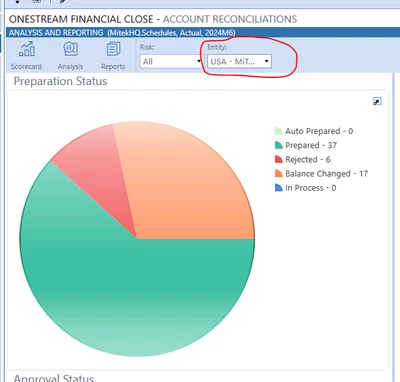
Account Rec Dashboard - choose entity via combo box instead of WF Profile
Hello. I am a total rookie with dashboards, and am failing miserably at trying to tweak one for the first time. OneStream has an existing dashboard for RCM; there is a chart called cht_ReconPreparationStatus_RCM that I want to use, but instead of the entity being populated from the WF Profile, I want the user to be able to choose the entity in a combo box. I have created a combo box, and I have created an entity parameter for the combo box. But I'm just kind of lost as to what settings I need to change. I also assume this needs to be tweaked in the business rule, but I have tried a million different options and can't come up with it. I feel like this should be an easy one, but I clearly still have a lot to learn!
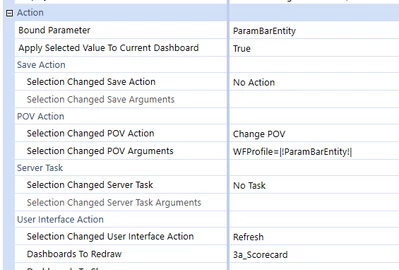
Combo Box settings (ParamBarEntity is my new parameters i created. And the Dashboard 3a_scorecard is just a copy of OneStreams 3a_scorecard_RCM that already exists)
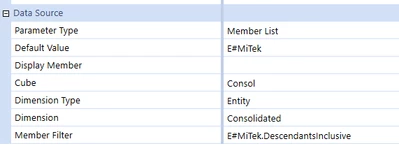
ParamBarEntity - my new parameter
Data Adapter: cht_ReconCountPreparationStatus
the total Method Query is: {RCM_HelperQueries}{GetReconCountPreparationStatus}{RoleFilter=[Administrator],RiskLevel=|!ParamBarRiskLevelList!|,wfprofile=|!ParamBarEntity!|}
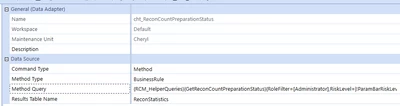
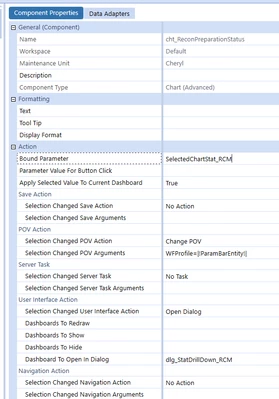
Chart properties: cht_ReconPreparationStatus (mainly copied from Onestream's existing cht_ReconPreparationStatus_RCM chart) but i added the "Change POV"
RCM_HelperQueries{GetReconCountPreparationStatus}

RCM_SolutionHelper{GetReconCountPreparationStatusforChart{
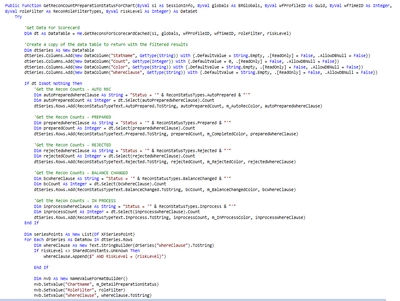
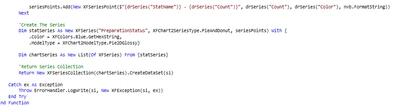
I couldnt find a way to nicely copy and paste the code, so if someone has a tip for that, i'll take it!
Please let me know what other information I can provide. I just want to be able to view this chart using an entity selected from this combo box (it is currently pulling numbers from the entity selected in the WorkFlow)