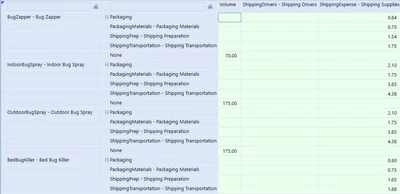
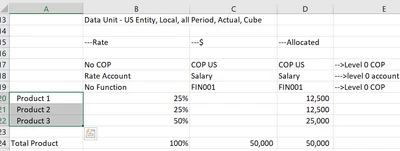
This concept is addressed in the 'Financial Rules and Calculations Handbook'. It requires a nested Data Buffer Cell Loop where both data buffers are looped through and the dimensions properties of both are applied to the result cell. Below is the example of the data and the corresponding rule:
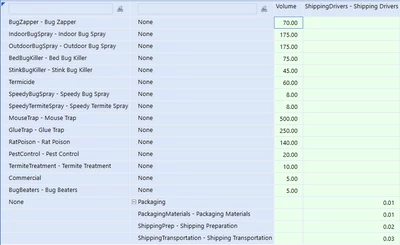
Here is the example given in the book:
If args.CustomCalculateArgs.FunctionName.XFEqualsIgnoreCase("DoubleUnbalanced") Then
						'----------------------------------------------------------------------------------------------------------------------
							'Book Reference:		Chapter 4 - DBCL Example - DBCL vs Eval
							'Purpose:				Example of a Data Buffer Cell Loop used to solve the Double Unbalanced problem
							'Run From:				Data Mgmt Step - Chapter 4 Examples - DoubleUnbalanced
							'View Results From:		Cube View - Chapter 4 Examples - Shipping Expense Calculation
							'Created by: 			Jon Golembiewski on 1/6/2022
							'------------------------------------------------------------------------------------------------------------------------

							api.Data.ClearCalculatedData(True,True,True,True,"A#ShippingExpense")

							'Create a result data buffer and destination info to add the cells to later
							Dim resultDataBuffer As DataBuffer = New DataBuffer()
							Dim destinationInfo As ExpressionDestinationInfo = api.Data.GetExpressionDestinationInfo("O#Import:I#None")

							'Declare the Volume data buffer with U2 fixed on None
							Dim volumeDataBuffer As DataBuffer = api.Data.GetDataBufferUsingFormula("RemoveZeros(A#Volume:O#Top:I#Top:U2#None)")

							'Retrieve the Sales Account Id before the loops so we don't retrieve it for each iteration
							Dim shippingExpenseId As Integer = api.Members.GetMemberId(dimtypeid.Account, "ShippingExpense")

							'Loop through the cells of the Volume data buffer
							For Each sourceCellVolume As DataBufferCell In volumeDataBuffer.DataBufferCells.Values
								'Retrieve the volume amount to be used in the calculation later
								Dim volumeAmount As Decimal = sourceCellVolume.CellAmount
								'Declare the Shipping Drivers data buffer with U1 fixed on None
								Dim shippingDataBuffer As DataBuffer = api.Data.GetDataBufferUsingFormula("RemoveZeros(A#ShippingDrivers:O#Top:I#Top:U1#None)")

									For Each sourceCellShipping As DataBufferCell In shippingDataBuffer.DataBufferCells.Values

										Dim shippingAmount As Decimal = sourceCellShipping.CellAmount

										'Create a new result cell to eventually add to the result data buffer
										'The cell properties of the source cell will be inherited
										Dim resultCell As New DataBufferCell(sourceCellShipping)

										'Set the target members For the XFCommon members
										resultCell.DataBufferCellPk.AccountId = shippingExpenseId
										'Inherit the UD1 detail from the Volume Cell
										resultCell.DataBufferCellPk.UD1Id = sourceCellVolume.DataBufferCellPk.UD1Id
										'Inherit the UD2 detail from the Shipping Driver Cell
										resultCell.DataBufferCellPk.UD2Id = sourceCellShipping.DataBufferCellPk.UD2Id

										'Do the logic to calculate the result amount
										resultCell.CellAmount = volumeAmount * sourceCellShipping.CellAmount

										'Add the new cell to the Result Data Buffer
										resultdatabuffer.SetCell(si,resultCell)
									Next
							Next

							'Save the Data Buffer using the Result Data Buffer and Destination Info
							api.Data.SetDataBuffer(resultdatabuffer,destinationinfo)
Result: