January 22, 2024
Solved

Automation for IIS Reset

  • January 22, 2024
  • 1 reply
  • 1 view

Hey folks, 
Just wondering if we can automate IIS reset in the task scheduler. I don't see any Snippets or related BRApis in the Extensibility Business Rules. Surfed through various Community posts but, didn't help much. Any guidance here will be helpful. 
 

Best answer by MarcusH

Our servers automatically recycle without Task Scheduler as part of the Application Server Configuration. But in answer to your question, I think there is an example of a script that resets IIS in Cloud Administration Tools (available from the Market Place). Have a look at the Extender script ExecuteCopy (I am just guessing where it is and it references other functions - I don't have CAT installed).

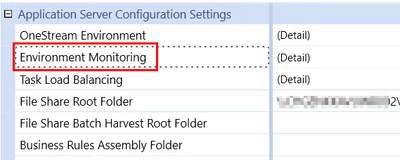
If you look at the Application Server Configuration under Environment Monitoring: 


MarcusH_0-1705927501545.png

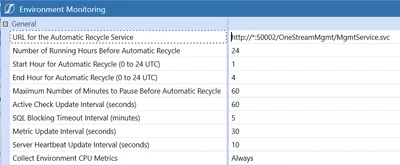
You then have the options to automatically reset iis:


MarcusH_2-1705927734861.png


1 reply

MarcusHAnswer
January 22, 2024

Our servers automatically recycle without Task Scheduler as part of the Application Server Configuration. But in answer to your question, I think there is an example of a script that resets IIS in Cloud Administration Tools (available from the Market Place). Have a look at the Extender script ExecuteCopy (I am just guessing where it is and it references other functions - I don't have CAT installed).

If you look at the Application Server Configuration under Environment Monitoring: 


MarcusH_0-1705927501545.png

You then have the options to automatically reset iis:


MarcusH_2-1705927734861.png


January 22, 2024

Thank you Marcus 🙂