
Best FileShare folder to use to import and delete csv files
Hi,
I have created a dashboard extender business rule that picks some CSV files from a server, save them in the File Share, extract some info from the file, then delete them.
The issue I am having is to find the right folder to use to import and then delete the files.
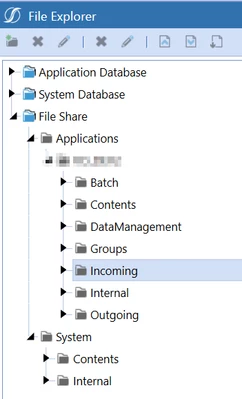
I initially used the Administrators folder in the File Share/Applications/Groups folder, but that folder is not visible to the not in the Administrators group, so the rule works fine for me but not for other users.
Then I have tried using the Incoming folder, which let me import the files, but does not let me delete the files.
Each folder in the File Share seems to have a different set of security properties, but that is not shown in the File Explorer. What is the purpose of each of the folders in the File Share (is each of them supposed to be used for a specific task?) and which one is better to use for my scope?
Thank you