
August 23, 2023
Solved

Calc values in forecast scenario by referencing S#Actual, V#Trailing12MonthAvg

  • August 23, 2023
  • 5 replies
  • 0 views

I have a forecast scenario S#AugFcst_7_5 with the following properties:

WF Time = 2023M7

WF start time = 2023M1

WF end time = 2024M12

# no input periods = 7

I have a Finance business rule function that is being initiated using a dashboard button in the workflow.  The dashboard button calls DM Sequence/step where data units are defined as WFScenario and T#root.WFTimePeriods, business rule = FPA, function name = ttmaverage

In the function (ttmaverage) I am limiting the calculation to only the base periods of 2024 and I want it to calculate V#Periodic by looking at S#Actual, V#Trailing12MonthAvg, T#2023M6

I receive the following error when executing it:
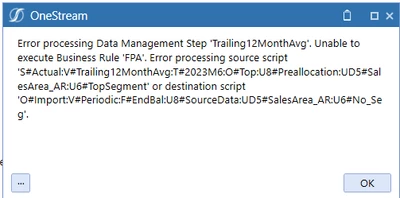

denisefockler_0-1692795547604.png

I believe the error is because I want it to calculate off S#Actual, T#2023M6, V#Trailing12MonthAvg and that includes time periods that fall outside the range of my WF scenario AugFcst_7_5.

I tested this by changing the formula to look at S#Actual, T#2023M6, V#Trailing6MonthAvg and the calculation works but obviously does not give me what I need.  If I use V#Trailing7MonthAvg or greater then it fails.

How can I calculate periodic values for S#AugFcst_7_5, 2024 base time periods from S#Actual, T#2023M6, V#Trailing12MonthAvg but still have my S#AugFcst_7_5 WF start time as 2023M1?


Best answer by RobbSalzmann

vkhudzey your post is not getting visibility in the forum because the forum is updated by most recent post, not most recently changed post.  I know about your question because I'm part of the thread so I got an email. I never would have seen it if I were not part of the thread, so 99.9% of people don't know you responded.

If you want to get help, I suggest a new, redundant post asking the exact same question.  That way everyone will see it.  

5 replies

August 23, 2023

Try changing the "UD5#SalesArea_AR" to "U5#SalesArea_AR"

August 23, 2023

I originally thought that was the issue also but it still did not work when I did that.  See below test I ran.  


denisefockler_0-1692807294633.png

I currently have as UD5# and the calculation works but only if I have V#Trailing6MonthAvg or something less than 6.


August 23, 2023

UPDATE:  my co-worker pointed me to the following post  https://community.onestreamsoftware.com/t5/Rules/Using-the-Trailing3MonthAvg-View-Member-in-a-Data-Buffer-Across/m-p/18876

I am not using data buffers but this post leads me to believe data buffers or not there is an issue with using TrailingxMon in a business rule where it can not cross years.  I will provide an update once I try the workaround in the referenced post.

July 4, 2024

Hello,

I'm getting the same error, has anyone found any solutions without hardcoding?

Thanks in advance!

July 6, 2024

vkhudzey your post is not getting visibility in the forum because the forum is updated by most recent post, not most recently changed post.  I know about your question because I'm part of the thread so I got an email. I never would have seen it if I were not part of the thread, so 99.9% of people don't know you responded.

If you want to get help, I suggest a new, redundant post asking the exact same question.  That way everyone will see it.  

July 9, 2024

RobbSalzmann  thanks Robb! I'll post it as new post then.