
June 19, 2024
Solved

Calculation based on time parameter

  • June 19, 2024
  • 1 reply
  • 0 views

I have declared CurrYear and CurrMonth to retrive year and month respectively.

Dim CurrTime As String = api.Pov.Time.Name
Dim CurrYear As Integer = TimeDimHelper.GetSubComponentsFromName(CurrTime).Year
Dim CurrMonth As Integer = TimeDimHelper.GetSubComponentNameFromName(currTime).Month
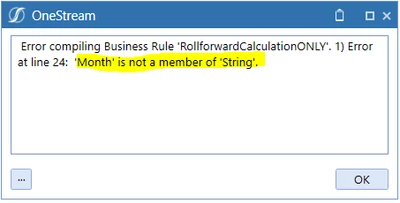

Manjunathak_0-1718803800193.png

can you help me to retrieve month in CurrMonth? 

Best answer by aformenti

Hi aformenti ,

thanks you're right,

can you also help me to break the calculation based on 2024M5?

if it is lease or equal 2024M5 run calc

If currYear < 2024 Then

     Calc

Else If currYear = 2024 & currMonth <=5

    Calc

End If 

End If


  the above code is not working for me


So, you want to run the calc2 in 2024 only up until 2024M5? Nothing to be calculated beyond 2024m5? in that case:

If CurrYear < 2024 then

Calc1

else If CurrYear.Equals(2024) AndAlso CurrMonth <= 5 Then 

calc2

end if 


1 reply

June 19, 2024

Hi Manjunathak ,

Sure, you can do this by using:

Dim CurrMonth As Integer = api.time.GetSubComponentsFromName(currTime).Month


June 19, 2024

Hi Manjunathak,

Just re-looking again at your initial code, your mistake was just an spelling issue:

TimeDimHelper.GetSubComponentsFromName(currTime).Month

June 19, 2024

Hi aformenti ,

thanks you're right,

can you also help me to break the calculation based on 2024M5?

if it is lease or equal 2024M5 run calc

If currYear < 2024 Then

     Calc

Else If currYear = 2024 & currMonth <=5

    Calc

End If 

End If


  the above code is not working for me