
August 2, 2024

Clear data through a data management job for specific accounts selected in parameter/s

  • August 2, 2024
  • 1 reply
  • 0 views

Hello community,

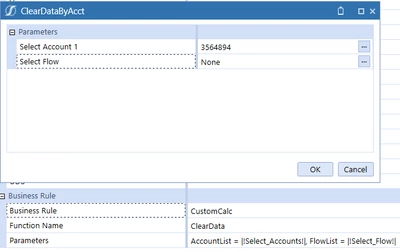
We have a Custom Calculate DM job that clears data by account and flow via parameter selection that works well.

andreeaG_0-1722636830433.png

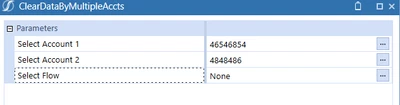
Our client wants to know if it is possible to select multiple base accounts at once to clear the data. The parameter options such as member filter does not allow selecting more than one account so I'm hoping, if this is possible, that maybe someone has used multiple NameValuePairs to achieve this via two parameters of the same dimension somehow. Throwing ideas that may or may not be good out here. Thanks in advance!

andreeaG_1-1722636958687.png


1 reply

August 4, 2024

Hi there - this is definitely possible and can be setup with one parameter bound to a combo box. In the display format of the combo box, set MultiSelect = True.


TheJonG_0-1722778216638.png

Then just make sure to put the parameter in square brackets in the DM Step i.e. AccountList = [|!Select_Accounts!|]. Now the value of the parameter when passed into the business rule through name/value pairs will be a comma separated list.


andreeaGAuthor
September 18, 2024

Apologies for the delay. The combo box is a great idea. What type of parameter does it have to be to allow the multi select? I tried a few of them including Member Dialog and it is not allowing the user to select more than one account at once. Using list type parameters allows typing of multiple accounts separated by commas but does not clear the data even though the task completes.

September 18, 2024

Ok so I don't think you will be able to multiselect from the parameter prompt screen you get when running the Step/Sequence directly from Data Management. To implement the multi-select functionality you would have to attach the Combo Box along with a Button that runs the DM Sequence to a Dashboard. Then the user can multiselect within the Combo Box.