
November 23, 2023
Solved

Command returning all Application Currencies

  • November 23, 2023
  • 3 replies
  • 0 views

Hi,

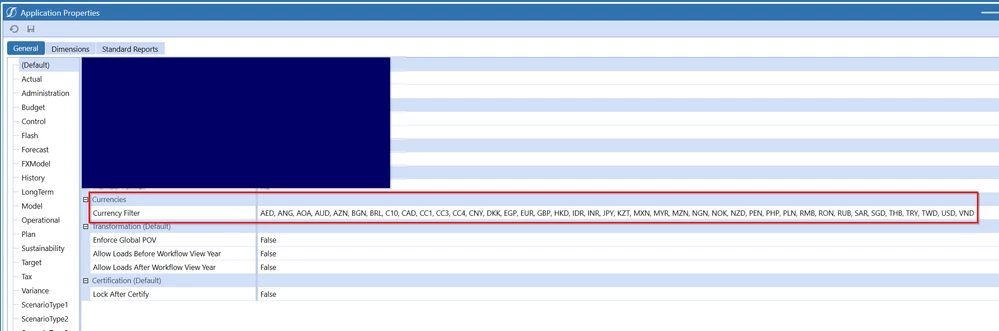
is there an BrApi command that returns the Application Currencies, ideally as a list of strings?

AndreaF_2-1700760284102.png

I would like to use the output, i.e. the list of currencies, in an Extender business rule, where I need to loop through them.

Thank you


Best answer by JackLacava

BRApi.Utilities.GetApplicationProperties(si).CurrencyFilter. Manipulate it with StringHelper.SplitString to get it as a List of String objects.

3 replies

November 24, 2023

Hi Andrea

I couldn't see a BRApi function that would get you this list - hopefully someone else can, but failing that you can query the AppProperty table to get the list. 

Below is a snippet of code (VB.NET) that will give you what you need:

Using dbConn As DbConnInfo = BRApi.Database.CreateApplicationDbConnInfo(si)
	'Query the App Property table to get the currency list
	Dim sCurrencyFilter As String = BRApi.Database.ExecuteSql(dbconn, "SELECT Top 1 TextValue FROM AppProperty WHERE Name = 'CurrencyFilter'", False).Rows(0)(0)
	
	'Split currency string into array of currencies
	Dim currencies As String() = sCurrencyFilter.Split(New String() {", "}, StringSplitOptions.None)
	
	'Loop through each currency
	For Each curr In currencies
		'Get currency object using currency name
		Dim objCurrency As Currency = BRApi.Finance.Cons.GetCurrency(si, curr)

		'Do what you like with the currency...
		BRApi.ErrorLog.LogMessage(si, curr)
	Next
End Using

Regards,

Mark

November 24, 2023

BRApi.Utilities.GetApplicationProperties(si).CurrencyFilter. Manipulate it with StringHelper.SplitString to get it as a List of String objects.

September 19, 2024

Hi Jack, I need this list but can't use the split string, let alone get it to display. I've tried different permutations, checked articles and tested examples that use other approaches. Can you please tell me where I'm going wrong? 

Dim appCurrencies As String = _ BRApi.Utilities.GetApplicationProperties(si).CurrencyFilter.ToString
Dim strCurrencies As List(Of String) = StringHelper.SplitString(appCurrencies, ",", _ StageConstants.ParserDefaults.DefaultQuoteCharacter)
Brapi.ErrorLog.LogMessage(si, "appCurrenciesDisplay: " & appCurrenciesDisplay) '-- works
Brapi.ErrorLog.LogMessage(si, "strCurrencies: " & strCurrencies.toString) '--doesn't work


September 20, 2024

Please ignore, worked it out. Thank you for your posts, Jack.

AndreaFAuthor
November 24, 2023

Thank you both for your help!

I would have expected to see it in the formula helper panel, but maybe BrApi.Utilities is not included in there


AndreaF_0-1700819246787.png


November 24, 2023

It's there, but the helper tree can only go 2 levels deep. So you will find Brapi.Utilities.GetApplicationProperties, and if you select that and look at the Objects tab, you'll find the AppProperties object - click on it and you'll get its methods and properties, including CurrencyFilter.

November 24, 2023

Jack, that is brilliant. I never knew that you could click on the objects...

I used to scroll through intellisense.


MarkBird_0-1700820157606.png