October 24, 2023
Solved

Confirmation Rule to check for nodata vs 0

  • October 24, 2023
  • 1 reply
  • 1 view

I need to be able to write a confirmation rule that checks for nodata vs a value of zero.   Can someone help with the syntax


I have this - 

Dim cellstatus As DataCellStatus = api.Data.GetDataCell("Cb#CimpressConsol:P#TotCimpress:C#Local:S#Actual:V#YTD:A#BS_NoMap:F#EndBal:O#Top:I#Top:U1#Top:U2#Top:U3#Top:U4#Top:U5#Top:U6#None:U7#None:U8#None").cellstatus

but I dont know how to build the If to check on the result.
 

Best answer by Big_Rick_CPM

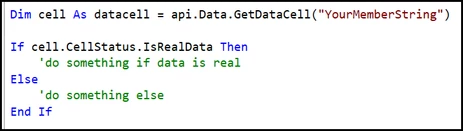
The cellStatus property has several Boolean properties/methods you can call to determine the status. I would do something such as the following:


image.png

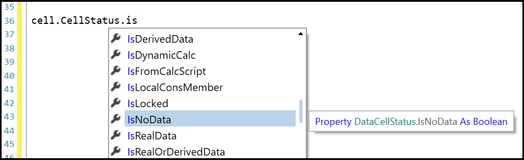
The below shows all the available Boolean properties you can use from a DataCell cell status:


image.png

1 reply

October 24, 2023

The cellStatus property has several Boolean properties/methods you can call to determine the status. I would do something such as the following:


image.png

The below shows all the available Boolean properties you can use from a DataCell cell status:


image.png

October 25, 2023

Thanks!  This is perfect.   Can I ask where you get this information on how to do this?   I was not able to find anything in the OS documentation or even in the OS books.

October 26, 2023

Some of the guides, such as the 'Design and Reference Guide' or 'OneStream Finance Rules and Calculations Handbook' mention cell status properties for either a data cell or data buffer cell, but they do not explicitly show examples like you mention. For me, I find scrolling through the IntelliSense window in the OS IDE to be the easiest approach for finding methods to use.