
July 12, 2023
Solved

Create View using Extender rule

  • July 12, 2023
  • 4 replies
  • 0 views

Hi All - I am trying to create a View using a Extender BR and It is compainling without any issue but when I try to execute it am getting the below error. Any help would be appreciated.


 Dim vSQL As New Text.StringBuilder()
			   vSQL.AppendLine("CREATE View dbo.v_stageData AS
SELECT
WFP.ProfileName As WorkFLowProfileName,
S.Sn AS SrcScenario,
T.SnT AS TgtScenario,
S.Tm AS SrcTime,
T.TmT AS TgtTime, 
S.Et AS SrcEntity,
T.EtT AS TgtEntity,
S.Ac AS SrcAccount,
T.AcT AS TgtAccount,
S.Fw AS SrcFlow,
T.FwT AS TgtFlow,
S.Og AS SrcOrgin,
T.OgT AS TgtOrgin,
S.Cn AS SrcConsol,
T.CnT AS TgtConsol,
S.Ic AS SrcICP,
T.IcT AS TgtICP,
S.U1 AS SrcU1,
T.U1T AS TgtU1,
S.U2 AS SrcU2,
T.U2T AS TgtU2,
S.U3 AS SrcU3,
T.U3T AS TgtU3,
CAST(S.Am AS DECIMAL(18,2)) AS Amount
FROM StageSourceData S  
INNER JOIN StageTargetData T ON  S.Wfk=T.Wfk AND S.WtK = T.WtK AND S.Ri = T.Ri
INNER JOIN WorkflowProfileHierarchy WFP ON WFP.ProfileKey = S.Wfk
WHERE T.SnT = 'Actual'
AND T.TmT = '2023M1'
AND WFP.ProfileName = 'USA_DataLoad'")
			   
			   Using aDbConn As DbConnInfo = BRApi.Database.CreateApplicationDbConnInfo(si)
			   Brapi.Database.ExecuteSql(aDbConn,aDbConn.ToString,False)
			   
		   End Using
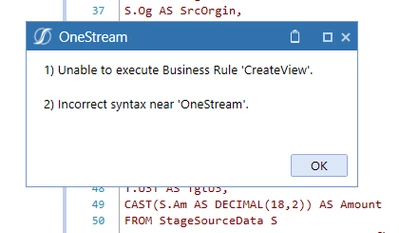


Kris_0-1689190843133.png


Best answer by Henning

I believe you have an error in your execution command:

 Brapi.Database.ExecuteSql(aDbConn,aDbConn.ToString,False)


This should be the SQL command you wish to execute I believe


Henning_0-1689241858470.png

I.e. you need to use the (in your case) vSQL in the second position:

Brapi.Database.ExecuteSql(aDbConn, vSQL, False)


If that does not work, write your vSQL into the error log and analyze it there in order to see the final string that is supposed to be executed:
brapi.ErrorLog.LogMessage(si,"vSQL script: See details below.", vSQL)

4 replies

July 13, 2023

Double check your SQL connection string. may be there is any syntax error.

July 13, 2023

I suspect the issue is not in this SQL, but somewhere else in your code - possibly the Imports section. Did you compile it successfully ?

HenningAnswer
July 13, 2023

I believe you have an error in your execution command:

 Brapi.Database.ExecuteSql(aDbConn,aDbConn.ToString,False)


This should be the SQL command you wish to execute I believe


Henning_0-1689241858470.png

I.e. you need to use the (in your case) vSQL in the second position:

Brapi.Database.ExecuteSql(aDbConn, vSQL, False)


If that does not work, write your vSQL into the error log and analyze it there in order to see the final string that is supposed to be executed:
brapi.ErrorLog.LogMessage(si,"vSQL script: See details below.", vSQL)

KrishnaAuthor
July 13, 2023

Thanks Henning. It was a good Catch and Now it is working.

Appreciate your quick help.

KrishnaAuthor
July 14, 2023

There is an another way to create view using the  Table Data Manager..FYI...
