
May 19, 2023

Dashboard Extender BR fails to retrieve WF information for Scenario and Period

  • May 19, 2023
  • 7 replies
  • 0 views

Hi all,

I'm working on a Dashboard Extender BR where different processes will be triggered depending on the button selected by the user on the dashboard.

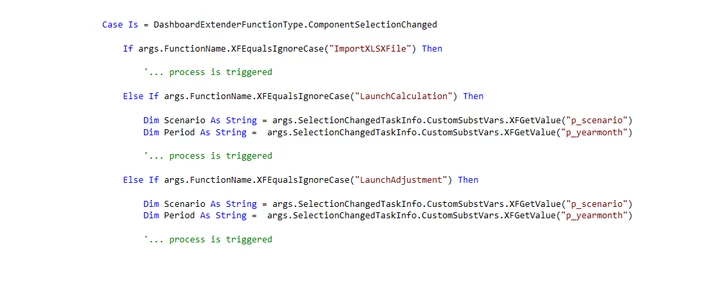
The BR is structured this way:
fc_1-1684498835636.png

The two parameters shown above (p_scenario and p_yearmonth) retrieve the value for Scenario and Period from the WF.

Every time the user clicks on a different button, two variables are assigned the value of WF Period and WF Scenario as shown above. 


The process works fine for all of the dashboard buttons except one. When that one is clicked, the values of WF Period and Scenario are not retrieved. The two variables shown above are left as empty strings. 

Any idea what might be causing this? 

I'm using the same formula for all of the buttons:

Dim Scenario As String = args.SelectionChangedTaskInfo.CustomSubstVars.XFGetValue("p_scenario")

it works fine on all buttons except that one


Thanks in advance for any help on this!

    7 replies

    May 19, 2023

    I would focus on the button that is not working.  Through deductive reasoning, if the same code serves multiple buttons and only one button is not functioning correctly, you should be able to rule out the code and focus on what is unique to the button that is failing.

    Can you tell more about that particular button?


    fc5Author
    May 19, 2023

    Hi Rob

    All the buttons are structured the same:

    fc_0-1684500935655.png

    once clicked, they trigger the execution of the BR and refresh the dashboard.

    If that button is clicked, the overall process works fine, but somehow those two dimensions are not retrieved, and therefore the resulting data is wrong. 


    Even more strange is that only the WF dimensions are not retrieved.

    In the dashboard, the user has a dropdown list to choose the desired base Entity, which is then assigned to a variable the same way Period and Scenario are. When that button is clicked, Scenario and Period dimensions are left empty, but Entity is correctly assigned the Entity selected by the user on the dashboard.

    fc_1-1684501383784.png


    May 19, 2023

    Pass the parameters from the button to the rule:

    EricOsmanski_0-1684502132508.png


    An alternative way to grab the values passed from button:

    EricOsmanski_1-1684502205511.png


    fc5Author
    May 22, 2023

    I found out what seems to be causing the problem

    fc_1-1684750096343.png

    the main dashboard is composed of two embedded ones. If opened in Design Mode, on the side there is a list of the parameters in use. 

    If I remove the second embedded dashboard component from the main dashboard, the parameters p_scenario and p_yearmonth (which store the WF values of scenario and period) are also removed from the list.

    Hence why when the button is clicked, the BR is not able to retrieve the values for WF scenario and period.

    Does anyone know what's the relationship between the embedded dashboard components and the parameters shown in the list? Is there a way to add or remove parameters from there?

    Thank you


    May 22, 2023

    Did you try passing the parameter like Eric was saying? What type of parameters are they, when you say WF parameters, I'm thinking of the substitution variables. They don't seem like using sub vars. 

    fc5Author
    May 22, 2023

    That's correct, both parameters (p_scenario and p_yearmonth) are assigned a sub var (|WFScenario| and |WFTime|).

    The issue with Eric's suggestion is (please correct me if I'm wrong) that through the 'Selection Changed Server Task' I can only pass one BR. 

    At the moment, I'm passing the BR I want to launch when the button is clicked

    fc_0-1684761699589.png

    If I replace this, I won't be able to trigger the BR that should be triggered. 

    May 22, 2023

    He is not asking you to replace it, he is suggesting you to pass the parameters as {scenario=|!scenario!|}. However, since you are using the substitution variable, you don't even need those parameters. Just use Brapi.Workflowcluster.timekey and scenariokey and use timedimhelper and scenariodimhelper to get the names

    fc5Author
    May 22, 2023

    ok that solved the issue, thank you all for the help!

    Just for my knowledge, I'd still be curious to know if and how it would be possible to modify the list of parameters on the side of a dashboard when opened in design mode

    fc_1-1684765918822.png

    does anyone have any idea?


    May 22, 2023

    Design mode lets you edit the dashboard and components and parameters. However, to modify them (I think you mean remove them?) then you need to go to the individual components, and use the "pencil" icon to edit.

    fc5Author
    May 23, 2023

    I'm sorry I didn't explain my question very well, I'll try to be more clear

    From the "backend" section of the dashboard, it's possible to add different components into the dashboard

    fc_0-1684827689602.png

    In this case I added an embedded dahsboard, a button, and a SQL editor.
    When I open the dashboard in design mode, on the left I see the different components that were added to the dashboard, plus a list of parameters

    fc_3-1684828037282.png


    This list is not present in the "backend" section, but becomes visible only when the dashboard is launched in design mode.

    What is not clear to me is how is this list generated? Is it automatically generated by OS? And is it possible to modify it (add or remove parameters from it)?

    Hope my doubt is more clear now

    Thanks for the help!