
June 14, 2023
Solved

Data source Connector - Nested Drill back

  • June 14, 2023
  • 5 replies
  • 2 views

Hi,


      I am trying to build a Drill back functionality in one of data source connector business rules. I tried looking into One Stream reference guide on Data Source connector business rules and I found below reference for nested Drill back functionality.
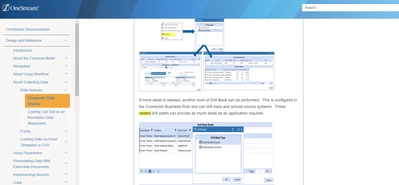

mkalluri_0-1686765932473.png

But practically when I tried to drill back on a drill back detail row, OS returns following message. The click on the drill back is not even calling the connector business rules any more.
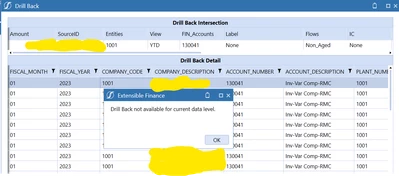

mkalluri_1-1686766219438.png

Can someone help me with the ways to code with nested drill backs. I tried to follow the examples from Golfstream application.

Private Function GetDrillBackTypeList(ByVal si As SessionInfo, ByVal globals As BRGlobals, ByVal api As Transformer, ByVal args As ConnectorArgs) As List(Of DrillBackTypeInfo)
	Try
		'Create the SQL Statement
		Dim drillTypes As New List(Of DrillBackTypeInfo)

		If args.DrillCode.Equals(StageConstants.TransformationGeneral.DrillCodeDefaultValue, StringComparison.InvariantCultureIgnoreCase) Then
			'Source GL Drill Down
			drillTypes.Add(New DrillBackTypeInfo(ConnectorDrillBackDisplayTypes.FileShareFile, New NameAndDesc("InvoiceDocument", "Invoice Document")))
			drillTypes.Add(New DrillBackTypeInfo(ConnectorDrillBackDisplayTypes.DataGrid, New NameAndDesc("MaterialTypeDetail", "Material Type Detail")))

		ElseIf args.DrillCode.Equals("BOMDetail", StringComparison.InvariantCultureIgnoreCase) Then
			'Material Type Drill Down
			drillTypes.Add(New DrillBackTypeInfo(ConnectorDrillBackDisplayTypes.DataGrid, New NameAndDesc("MaterialAllProducts", "Material All Products")))
			drillTypes.Add(New DrillBackTypeInfo(ConnectorDrillBackDisplayTypes.DataGrid, New NameAndDesc("MaterialAllVendors", "Material All Vendors")))

		End If

		Return drillTypes

	Catch ex As Exception
		Throw ErrorHandler.LogWrite(si, New XFException(si, ex))
	End Try
End Function

'Execute specific drill back type
Private Function GetDrillBack(ByVal si As SessionInfo, ByVal globals As BRGlobals, ByVal api As Transformer, ByVal args As ConnectorArgs, ByVal connectionString As String) As DrillBackResultInfo
	Try
		If args.DrillBackType.NameAndDescription.Name.Equals("InvoiceDocument", StringComparison.InvariantCultureIgnoreCase) Then
			'Level 1: Show FileShare File
			Dim drillBackInfo As New DrillBackResultInfo
			drillBackInfo.DisplayType = ConnectorDrillBackDisplayTypes.FileShareFile
			drillBackInfo.DocumentPath = Me.GetDrillBackDocPath_L1(si, globals, api, args)
			Return drillBackInfo

		ElseIf args.DrillBackType.NameAndDescription.Name.Equals("MaterialTypeDetail", StringComparison.InvariantCultureIgnoreCase) Then
			'Level 1: Return Drill Back Detail
			Dim drillBackSQL As String = GetDrillBackSQL_L1(si, globals, api, args)
			Dim drillBackInfo As New DrillBackResultInfo
			drillBackInfo.DisplayType = ConnectorDrillBackDisplayTypes.DataGrid
			drillBackInfo.DataTable = api.Parser.GetXFDataTableForSQLQuery(si, DbProviderType.OLEDB, connectionString, True, drillBackSQL, False, args.PageSize, args.PageNumber)
			Return drillBackInfo

		ElseIf args.DrillBackType.NameAndDescription.Name.Equals("MaterialAllProducts", StringComparison.InvariantCultureIgnoreCase) Then
			'Level 1: Return Drill Back Detail
			Dim drillBackSQL As String = GetDrillBackSQL_L2(si, globals, api, args, True, False)
			Dim drillBackInfo As New DrillBackResultInfo
			drillBackInfo.DisplayType = ConnectorDrillBackDisplayTypes.DataGrid
			drillBackInfo.DataTable = api.Parser.GetXFDataTableForSQLQuery(si, DbProviderType.OLEDB, connectionString, True, drillBackSQL, False, args.PageSize, args.PageNumber)
			Return drillBackInfo

		ElseIf args.DrillBackType.NameAndDescription.Name.Equals("MaterialAllVendors", StringComparison.InvariantCultureIgnoreCase) Then
			'Level 1: Return Drill Back Detail
			Dim drillBackSQL As String = GetDrillBackSQL_L2(si, globals, api, args, False, True)
			Dim drillBackInfo As New DrillBackResultInfo
			drillBackInfo.DisplayType = ConnectorDrillBackDisplayTypes.DataGrid
			drillBackInfo.DataTable = api.Parser.GetXFDataTableForSQLQuery(si, DbProviderType.OLEDB, connectionString, True, drillBackSQL, False, args.PageSize, args.PageNumber)
			Return drillBackInfo

		Else
			Return Nothing
		End If

	Catch ex As Exception
		Throw ErrorHandler.LogWrite(si, New XFException(si, ex))
	End Try
End Function

Thanks,

Mohan Alluri.

Best answer by mkalluri

I was able to find the solution and it is to have a column with name called "DrillTypeCode" in the first drill back result. When you drill back again the connector will be called with ActionType as GetDrillBackTypes and args.DrillCode will have the value from the column "DrillTypeCode" of the row you are performing drillback.

5 replies

June 14, 2023

I've written about this in the Planning book with examples. You need to play around with your first drill and use that in the second.

mkalluriAuthor
June 14, 2023

Hi ckattookaran,

Can you point me to the examples you are referring to please?

Thanks.

August 3, 2025

Dont know if someone pointed you to the sample code in the book. If you search for 'drillbacktypeinfo' you will be right at the sample code for one of the two functions you need in your connector rule.

mkalluriAuthorAnswer
June 14, 2023

I was able to find the solution and it is to have a column with name called "DrillTypeCode" in the first drill back result. When you drill back again the connector will be called with ActionType as GetDrillBackTypes and args.DrillCode will have the value from the column "DrillTypeCode" of the row you are performing drillback.

September 20, 2023

Were you able to pull data from Drill Back Detail screen same as the one from Staging Area (sourceValues.Item(StageTableFields.StageSourceData.DimEntity)?

mkalluriAuthor
September 20, 2023

Yes, precisely you can use below statement.

args.GetSourceRowValue(StageTableFields.StageSourceData.DimEntity)  

April 3, 2024

Hi!  I'm trying to create something similar.  Do you mind sharing step by step instructions please?

April 8, 2024

Hi,
Are you trying to do a nested drill back ?

June 26, 2024

Hello Seangly, im also tryng to do a drillback option to my BR connector, but i have no idea how i can write it down on my script, any help or instructions from you guys is well apreciated!
Here is my complete BR connector it pulls data from a biblent table:

Imports System.Data
Imports System.Data.Common
Imports System.IO
Imports System.Collections.Generic
Imports System.Globalization
Imports System.Linq
Imports Microsoft.VisualBasic
Imports System.Windows.Forms
Imports OneStream.Shared.Common
Imports OneStream.Shared.Wcf
Imports OneStream.Shared.Engine
Imports OneStream.Shared.Database
Imports OneStream.Stage.Engine
Imports OneStream.Stage.Database
Imports OneStream.Finance.Engine
Imports OneStream.Finance.Database

Namespace OneStream.BusinessRule.Connector.Central_Connector_BiBlend
	Public Class MainClass		
		
Public Function Main(ByVal si As SessionInfo, ByVal globals As BRGlobals, ByVal api As Transformer, ByVal args As ConnectorArgs) As Object
    Try

        'Get the query information
		Dim extConnName As String = "OneStream BI Blend" 
        Dim dbConn As DbConnInfo = BRApi.Database.CreateExternalDbConnInfo(si, extConnName)
        Dim connectionString As String = dbConn.ConnectionString
		
        'Get the Field name list or load the data 
        Select Case args.ActionType
            Case Is = ConnectorActionTypes.GetFieldList
                'Return Field Name List if using Field List Method to get field list in GetFieldList
                '-----------------------------------------------------------
                Dim fieldList As List(Of String) = GetFieldList(si, globals, api)
                Return fieldList

            Case Is = ConnectorActionTypes.GetData
				'Dim connectionString As String = "BIBlend Local DB"
				Dim provType As DbProviderType = DbProviderType.SqlServer 'Update accordingly
				Dim sFirstPartNameBIBlendTable As String = "BIB_Dev_CENTRAL_TASKSCentral_Loads_Operationnel" 'Update with your table name
				Dim sWFScenario As String = BRApi.Finance.Members.GetMemberName(si,DimTypeId.Scenario,si.WorkflowClusterPk.ScenarioKey)
				Dim sWFTime As String = BRApi.Finance.Time.GetNameFromId(si, si.WorkflowClusterPk.TimeKey)
				Dim sBIBlendTableName As String = $"{sFirstPartNameBIBlendTable}_{sWFScenario}_BiB_{sWFTime}"

				Dim wfKey As String = String.empty
				Dim wfname As String = api.WorkflowProfile.GetAttributeValue(scenarioTypeID.Actual,sharedconstants.WorkflowProfileAttributeIndexes.Text4)
				'brapi.ErrorLog.LogMessage(si,"wfname = " & wfname)                

				'If wfname.Length > 0 Then
				If wfname.Contains(sFirstPartNameBIBlendTable) Then
					
					'Process Data
                	Dim sourceDataSQL As String = GetSourceDataSQL(si, globals, api, wfKey, sBIBlendTableName)
                	api.Parser.ProcessSQLQuery(si, DbProviderType.SqlServer, connectionString, False, sourceDataSQL, False, api.ProcessInfo)
                	'api.Parser.ProcessSQLQuery(si, DbProviderType.SqlServer, connectionString, False, "Select Entity From " & sBIBlendTableName, False, api.ProcessInfo)
                
				Else
					Throw New Exception("No BiBlend Table specified in Text4 of this WorkFlow")
				End If
				
			Return Nothing

        End Select
        
    Catch ex As Exception
       Throw ErrorHandler.LogWrite(si, New XFException(si, ex))
    End Try
End Function     
  
'Create the field list SQL Statement Method to get field list (Recommended)
'-----------------------------------------------------------
Private Function GetFieldList(ByVal si As SessionInfo, ByVal globals As BRGlobals, ByVal api As Transformer) As List(Of String)
    Try
		Dim sWFTime As String = BRApi.Finance.Time.GetNameFromId(si, si.WorkflowClusterPk.TimeKey)
		'brapi.ErrorLog.LogMessage(si,"sWFTime = " & sWFTime) 
        Dim fields As New List(Of String) 

        'Comment/Uncomment to make fields valid. This controls what can be mapped in Data Source as well as what the Query itself will bring in
        	'fields.Add("Wfk")
			'fields.Add("Wsk")
			'fields.Add("Wtk")
			'fields.Add("Fak")
			'fields.Add("Ri")
			'fields.Add("Rt")
			'fields.Add("Si")
			'fields.Add("Lb")
			'fields.Add("Tv")
			fields.Add("Entity")
			'fields.Add("EtT")
			'fields.Add("EtR")
			'fields.Add("Pr")
			'fields.Add("PrT")
			'fields.Add("PrR")
			'fields.Add("Cn")
			'fields.Add("CnT")
			'fields.Add("CnR")
			'fields.Add("Vw")
			'fields.Add("VwT")
			'fields.Add("VwR")
			'fields.Add("Sn")
			'fields.Add("SnT")
			'fields.Add("SnR")
			'fields.Add("Tm")
			'fields.Add("TmT")
			'fields.Add("TmR")
			fields.Add("Account")
			'fields.Add("AcT")
			'fields.Add("AcR")
			fields.Add("Flow")
			'fields.Add("FwT")
			'fields.Add("FwR")
			'fields.Add("Og")
			'fields.Add("OgT")
			'fields.Add("OgR")
			'fields.Add("Ic")
			'fields.Add("IcT")
			'fields.Add("IcR")
			fields.Add("FinalClient")
			'fields.Add("U1T")
			'fields.Add("U1R")
			fields.Add("Client")
			'fields.Add("U2T")
			'fields.Add("U2R")
			'fields.Add("U3")
			'fields.Add("U3T")
			'fields.Add("U3R")
			'fields.Add("U4")
			'fields.Add("U4T")
			'fields.Add("U4R")
			fields.Add("Governance")
			'fields.Add("U5T")
			'fields.Add("U5R")
			fields.Add("Commodity")
			'fields.Add("U6T")
			'fields.Add("U6R")
			'fields.Add("U7")
			'fields.Add("U7T")
			'fields.Add("U7R")
			'fields.Add("U8")
			'fields.Add("U8T")
			'fields.Add("U8R")
			'fields.Add("Fs")
			fields.Add("RawAmount")
			'fields.Add("ConvertedAmount")
			'fields.Add("A1")
			'fields.Add("A2")
			'fields.Add("A3")
			'fields.Add("A4")
			'fields.Add("A5")

			Return fields
    
    Catch ex As Exception
        Throw ErrorHandler.LogWrite(si, New XFException(si, ex))
    End Try   
End Function

'Create the data load SQL Statement
Private Function GetSourceDataSQL(ByVal si As SessionInfo, ByVal globals As BRGlobals, ByVal api As Transformer, ByVal wfKey As String, ByVal sBIBlendTableName As String ) As String
    Try
        'Create the SQL Statement
        Dim statement As New Text.StringBuilder
        Dim selectClause As New Text.StringBuilder
        Dim fromClause As New Text.StringBuilder
        Dim whereClause As New Text.StringBuilder
        Dim orderByClause As New Text.StringBuilder
        Dim fieldListForQuery As List(Of String) = GetFieldList(si, globals, api)
        Dim selectedFields As String = String.Join(", ", fieldListForQuery.ToArray())

        ' Build SELECT clause
        selectClause.Append("SELECT ") 
        selectClause.Append(selectedFields)
        selectClause.Append(" ")

        ' Build FROM clause
        fromClause.Append("FROM ")
        fromClause.Append("v")
        fromClause.Append(sBIBlendTableName)
        fromClause.Append(" ")

        ' Build WHERE clause
        whereClause.Append("WHERE 1=1 ")

        ' Get the list of assigned entities for this Workflow and put them together into a comma separated list
        Dim assignedEntities As List(Of WorkflowProfileEntityInfo) = BRAPi.Workflow.Metadata.GetProfileEntities(si, api.WorkflowProfile.profilekey)
        
        ' Check to make sure there are entities assigned to the WFP
        If assignedEntities Is Nothing Then
            BRAPI.ErrorLog.LogMessage(si, "No Entities assigned to WF Profile")
            Return Nothing
        End If

        ' Loop through the Workflow Profile assigned Entities and get all the names as strings
        Dim sbEntities As New StringBuilder()
        Dim isFirstItem As Boolean = True
        For Each entity As WorkflowProfileEntityInfo In assignedEntities
            If Not isFirstItem Then
                sbEntities.Append(", ")
            End If
            sbEntities.Append("'" & entity.EntityName & "'")
            isFirstItem = False
        Next

        whereClause.Append("AND Entity IN(" & sbEntities.ToString() & ") ")

        ' Create the full SQL Statement
        statement.Append(selectClause.ToString)
        statement.Append(fromClause.ToString)
        statement.Append(whereClause.ToString)

        ' Log the SQL statement for debugging
        'BRAPI.ErrorLog.LogMessage(si, statement.ToString)

        Return statement.ToString

    Catch ex As Exception
        Throw ErrorHandler.LogWrite(si, New XFException(si, ex))
    End Try   
End Function

	End Class
End Namespace


November 21, 2024

Here's what we did for a multi hop drill back that has two hops:

  1. 1st drill back is from MgtRpt cube back to FinRpt cube
  2. 2nd drill back is from FinRpt cube to Stage


Private Function GetDrillBackTypeList(ByVal si As SessionInfo, ByVal globals As BRGlobals, ByVal api As Transformer, 
												ByVal args As ConnectorArgs) As List(Of DrillBackTypeInfo)
	Try
		'Create the SQL Statement
		Dim drillTypes As New List(Of DrillBackTypeInfo)
			
		If args.DrillCode.XFEqualsIgnoreCase(StageConstants.TransformationGeneral.DrillCodeDefaultValue) Then
			'The 1st drill down is back to FinRpt Cube
			drillTypes.Add(New DrillBackTypeInfo(ConnectorDrillBackDisplayTypes.DataGrid, New NameAndDesc("FinRpt_Cube","FinRpt Cube")))
					
		Else If args.DrillCode.XFEqualsIgnoreCase("FinRpt_Stage") Then
			'The 2nd drill back is to FinRpt stage
			drillTypes.Add(New DrillBackTypeInfo(ConnectorDrillBackDisplayTypes.DataGrid, New NameAndDesc("FinRpt_Stage","FinRpt Stage")))
					
		End If	
				
		Return drillTypes
				
		Catch ex As Exception
		Throw ErrorHandler.LogWrite(si, New XFException(si, ex))
	End Try			
End Function


In the Get_Drill_Back funciton, we define the 1st and 2nd drill backs. The system will determine which drill back to use by evaluating the drillBackName string (args.DrillBackType.NameAndDescription.Name)


Private Function Get_Drill_Back(ByVal si As SessionInfo, ByVal globals As BRGlobals, ByVal api As Transformer, ByVal args As ConnectorArgs) As DrillBackResultInfo
    Try
	Dim drillBackName As String = args.DrillBackType.NameAndDescription.Name
	Dim sourceValues As Dictionary(Of String, Object) = api.Parser.GetFieldValuesForSourceDataRow(si, args.RowID)
	Dim drillBackInfo As New DrillBackResultInfo
	Dim TB_DataTable As New DataTable
	Dim ddsArgs As New DashboardDataSetArgs	
							
	If drillBackName.XFEqualsIgnoreCase("FinRpt_Cube") Then 
#Region "1st Level Drill Back"					

	ElseIf drillBackName.XFEqualsIgnoreCase("FinRpt_Stage") Then
#Region "2nd Level Drill Back"

	Else
	    Return Nothing		
    	End If
			
    	Catch ex As Exception
		Throw ErrorHandler.LogWrite(si, New XFException(si, ex))
    End Try 
End Function


The trick is to add a hidden column to the 1st drill back result that will have contain the name of the 2nd drill back. This column (DrillTpeCode) is not visible to the user but is visible to args.DrillBackType.NameAndDescription.Name. The first drill back looks like this:


If drillBackName.XFEqualsIgnoreCase("FinRpt_Cube") Then '<<-- Evaluate the name of the derill back to determine which drill back to use
#Region "1st Level Drill Back"					
	If (Not sourceValues Is Nothing) And (sourceValues.Count > 0) Then      
		'Get the data from FinRpt cube using a data set function into a temp table
		TB_DataTable = Get_Cube_Data(si, api, ddsArgs, cubeName, entityDimName, entityName, scenarioName, periodName, filter, exportToFile)	
						
		'Add a column to the 1st drill back that will have the naem of the 2nd drill back
		'Note: the new column will not be visible in the drill back result, but will be visible
		'      in args.DrillBackType.NameAndDescription.Name
		Dim colDrillTypeCode As New DataColumn("DrillTypeCode", GetType(String))
		colDrillTypeCode.DefaultValue="FinRpt_Stage"
		TB_DataTable.Columns.Add(colDrillTypeCode)
						
		'Pass the temp table into the drillBack
		drillBackInfo.DisplayType = ConnectorDrillBackDisplayTypes.DataGrid  
		drillBackInfo.DataTable = New XFDataTable(si, TB_DataTable, Nothing, SharedConstants.Unknown)		
		
		Return drillBackInfo							
	Else
		Return Nothing
	End If 
#End Region


The 2nd drill back uses a query that gets data from the Stage table based on the values that are shown in the first drill back. This qury itself is written in a data adapter called SQL_Stage_Drill_Back and it uses dynamic parameters in the WHARE section. The first part of the function substitutes these dynamic parameters with the SourceValues (api.Parser.GetFieldValuesForSourceDataRow(si, args.RowID)). The 2nd drill down looks like this:


ElseIf drillBackName.XFEqualsIgnoreCase("FinRpt_Stage") Then '<<<--- The name of the 2nd drill back is saved in the hidden column added to the first drill back table (DrillTypeCode)
#Region "2nd Level Drill Back"
	If (Not sourceValues Is Nothing) And (sourceValues.Count > 0) Then     
		'Create a dictionary of varables in the Adapter SQL that need to be changed
		Dim customSubstVars As New Dictionary(Of String, String)					
		customSubstVars.Add("SnT", SourceValues.Item("SnT").ToString)					
		customSubstVars.Add("EtT", SourceValues.Item("Et").ToString)						
		customSubstVars.Add("TmT", SourceValues.Item("TmT").ToString)						
		customSubstVars.Add("VwT", SourceValues.Item("Vw").ToString)						
		customSubstVars.Add("AcT", SourceValues.Item("Ac").ToString)						
		customSubstVars.Add("FwT", SourceValues.Item("Fw").ToString)						
		customSubstVars.Add("OgT", SourceValues.Item("A9").ToString)						
		customSubstVars.Add("IcT", SourceValues.Item("Ic").ToString)						
		customSubstVars.Add("U1T", SourceValues.Item("U1").ToString)
		customSubstVars.Add("U2T", SourceValues.Item("U2").ToString)
		customSubstVars.Add("U4T", SourceValues.Item("U4").ToString)
		customSubstVars.Add("U5T", SourceValues.Item("A5").ToString)
		customSubstVars.Add("U6T", SourceValues.Item("A6").ToString)
		customSubstVars.Add("U7T", SourceValues.Item("A7").ToString)

		Dim AdapterName As String = "SQL_Stage_Drill_Back"
		Dim AdapterSQL As XFDataSetInfo = BRApi.Dashboards.Process.GetXFDataSetInfoForAdapter(si, False, Nothing, "Default." & AdapterName, "SQL_Tbl", customSubstVars, 10000, True)
				
		'Get the data from stage into a data table
		Using dbConnApp As DbConnInfo = BRApi.Database.CreateApplicationDbConnInfo(si) 	
			TB_DataTable = BRApi.Database.ExecuteSql(dbConnApp, AdapterSQL.SubstitutedQuery, True)
							
			'Parse the temp table into the drillBack
			drillBackInfo.DisplayType = ConnectorDrillBackDisplayTypes.DataGrid 
			drillBackInfo.DataTable = New XFDataTable(si, TB_DataTable, Nothing, SharedConstants.Unknown)	
		End Using

		Return drillBackInfo
					
	Else     

	End If 
#End Region