
May 12, 2023
Solved

Derivative Check Rule - Display CheckRuleMessage

  • May 12, 2023
  • 3 replies
  • 0 views

Hi,

I'm using a Derivative Check Rule for the first time - using the sample available in GolfStream (HoustonSalesDetailOffset > ValidateCheckSum) - the Rule itself is working fine, I am getting the correct Pass/Fail Status.  My question is where can I expect to see the CheckRuleMessage displayed?

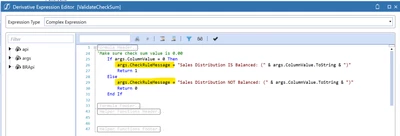
GolfStream Sample:
SarahS_0-1683886756605.png


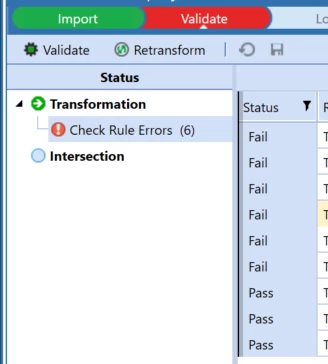
My Result (partial screenshot only as from Client App):
SarahS_1-1683886888326.png

It feels like there's a column missing from the screen?  Or perhaps it should be a pop-up window on the right like with other Validation/Intersection errors?

Thanks in advance for any help!
    Best answer by SarahS

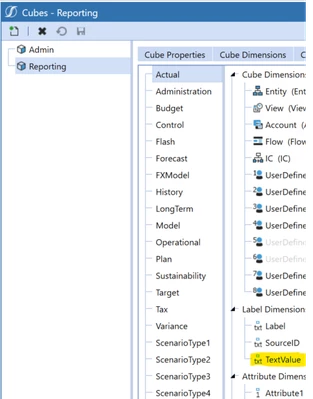
    In the end I raised a ticket for this - it's not a bug but a Cube Integration Setting!  We had disabled/not enabled the Label Dimension > TextValue (Text)

    SarahS_0-1684152578170.png


    3 replies

    May 12, 2023

    It should be in the Validation -> Rule Text  tab show as below -

    OS_Pizza_0-1683892269310.png


    SarahSAuthor
    May 12, 2023

    Hi - mine displays the same as yours - just with the text 'Check Rule Errors' - can you get it to display something different in your example?

    May 12, 2023

    You should look at the Rule Text column(highlighted in Green) and not the heading. You can display any text.

    OS_Pizza_0-1683893472638.png


    May 12, 2023

    I have tested on both 6.8 and 7.4.1 and Rule text gets displayed on both. 

    May 12, 2023

    Try creating a new derivative rule and use a simple expression as below.

    A#[A*]=All:V#[*]=All_View:F#[*]=All_Flow:IC#[*]=ALL_IC:E#[*]=All_Entity:UD2#[*]=ALL_UD2:UD3#[*]=All_UD3:UD4#[*]=All_UD4:UD5#[*]=All_UD5:UD6#[*]=All_UD6:UD7#[*]=All_UD7

    Read out this blog for more details on setting up the derivative rule.

    https://medium.com/@kesanmanish/blog4-onestream-the-underlooked-asset-called-derivative-8d6349c5d035

    SarahSAuthorAnswer
    May 15, 2023

    In the end I raised a ticket for this - it's not a bug but a Cube Integration Setting!  We had disabled/not enabled the Label Dimension > TextValue (Text)

    SarahS_0-1684152578170.png


    May 16, 2023

    Absolutely ! How can i forget this 😞