
July 13, 2023
Solved

Derivative Transformation Rule ActualQuantity field as Amount

  • July 13, 2023
  • 2 replies
  • 0 views

I would like to create a derivative transformation rule that will add _Qty to the end of the Account and pull the ActualQuantity field from the data source as the Amount.

My DataSource has a field for ActualQuantity.

I have a Derivative Rule that looks like this:


Steven_0-1689283755066.png

The complex expression on the derivative rule is:
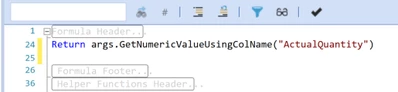

Steven_1-1689283826842.png

this returns 0 instead of the amount in the ActualQuantity field.


Thank you in advance.

Best answer by JackLacava

It's difficult to judge without looking at your full datasource configuration, but there are many ways to skin this particular cat. You could map the column to an Attribute Value dimension (e.g. AttributeValue1), then use args.GetNumericValue("AV1#") . You could get it by column index from api.Parser.DelimitedParsedValues(yourColIndex). Keep in mind that most values will be treated as text, not Numeric, even if they are numbers; so you will want to get them as "Dimension Values", unless they are in Amount or in Attribute Values.

2 replies

July 14, 2023

Is the DataSource a Matrix type, by any chance?

StevenAuthor
July 14, 2023

No

July 18, 2023

It's difficult to judge without looking at your full datasource configuration, but there are many ways to skin this particular cat. You could map the column to an Attribute Value dimension (e.g. AttributeValue1), then use args.GetNumericValue("AV1#") . You could get it by column index from api.Parser.DelimitedParsedValues(yourColIndex). Keep in mind that most values will be treated as text, not Numeric, even if they are numbers; so you will want to get them as "Dimension Values", unless they are in Amount or in Attribute Values.

July 17, 2023

Perhaps you can map the ActualQuantity column as Amount in the data source. Then in the derivative rule you wouldn't need to use a complex expression, just the rule expression you already have and a None logical operator.

StevenAuthor
July 17, 2023

There are two different amounts.  One for the Value, and one for the Quantity.  If I map the ActualQuantity to the Amount; then I have to use the complex expression to find the value instead of finding the ActualQuantity.  same issue with a different field.


I currently have created a SQL statement that pulls all the records twice.  Once for value and once for ActualQuantity.  This is working, but if I could do this in the Derivative rule, it would be cleaner.