
February 8, 2024

Dim String to use wildcard for dates

  • February 8, 2024
  • 1 reply
  • 0 views

Hey all,

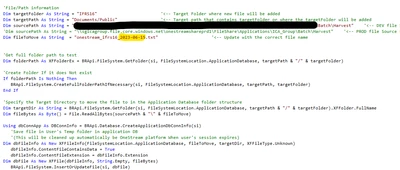
Pretty new to programming but have manage to get a file moving rule to work that basically moves a file from FileShareBatchHarvest to Application /Public structure for users to pickup. 

However, the rule currently needs the exact name of file. I have tried using wildcard symbols like "* #" for the date with no success. 

Does anyone have a recommended solution to get the variable dynamic on the date section?

Jones_0-1707413448793.png


1 reply

February 8, 2024

Here's an example of replacing the date in your filename with today's date:

Dim fileToMove As String = "onestream_ifrs16_2023-06-15.txt"
fileToMove = Regex.Replace(fileToMove, "\d{4}-\d{2}-\d{2}", DateTime.Now.ToString("yyyy-MM-dd"))


JonesAuthor
February 9, 2024

Thanks. Could you elaborate how to declare RegEx in an extender businessrule? Above gives below error message


Jones_0-1707463663154.png


Thanks in advance

JonesAuthor
February 9, 2024

I manage to figure out, and all works based on current date. Awesome big thanks for that!


Jones_0-1707464278664.png