Hi Edwin,
Thank you for providing the code and example, this is working as expected on my side as well. I just an additional question on whether this functionality could be leverage on sub-workflow forms as well?
For example, in the Input form step, we have multiple forms required to be completed, can the same function applied to each workflow forms?
Again, really appreciate your support on providing the solution on my initial inquiry.
Thank you.
Hi Jacky,
We can tweak the function to check for each form.
To do this you need to create a dictionary that stores the form name and the form status. Declare this as a private member of the class, where you declare global variables and then create a method in the class that will populate this variable with data. Please refer to the code below.
Private formStatusDict As New Dictionary(Of String, XFFormStatus)

' Function to create the dictionary of form names and statuses
		Private Sub PopulateFormStatusDictionary()
		    ' Retrieve the workflow name, scenario, and time key
		    Dim wfName As String = args.NameValuePairs("WFName") ' Hard-code if only checking one form
		    Dim wfScenario As String = ScenarioDimHelper.GetNameFromID(si, si.WorkflowClusterPk.ScenarioKey)
		    Dim wfTime As String = TimeDimHelper.GetNameFromId(si.WorkflowClusterPk.TimeKey)
		    Dim wfClusterPk As WorkflowUnitClusterPk = BRApi.Workflow.General.GetWorkflowUnitClusterPk(si, wfName, wfScenario, wfTime)

		    ' Get the required forms and populate the dictionary
		    Dim formsList As List(Of XFFormSummaryInfo) = BRApi.Forms.Metadata.GetForms(si, wfClusterPk).RequiredForms
		    formStatusDict.Clear() ' Clear the dictionary to avoid duplicates

		    For Each form In formsList
		        ' Add each form name as key and its status as value
		        formStatusDict(form.Name) = form.Status
		    Next
		End Sub
From your form status parameter, you need to add form name and enter the name of the form in square brackets (you will need a parameter for each form in the workflow), your parameter literal value will look like this
XFBR(Your_XFBR_Rule,GetFormStatus,WFName=|WFProfile|, FormName=[Test Form Name])
Now this will run the GetFormStatus function after populating the forms dictionary, the code will change as below:
If args.FunctionName.XFEqualsIgnoreCase("GetFormStatus")
					Dim formName As String = args.NameValuePairs.XFGetValue("FormName")
					Me.PopulateFormStatusDictionary()
					Return Me.GetFormStatus(formName)
				End If

' Function to check if a specific form is completed
		Private Function GetFormStatus(formName As String) As String
		    ' Ensure the dictionary has been populated
		    If Not formStatusDict.ContainsKey(formName) Then
		        Throw New System.Exception($"Form '{formName}' not found or dictionary not populated.")
		    End If

			Dim status As XFFormStatus = Me.formStatusDict(formName)

		    If status.Completed Then
				Return "Completed"
			Else
				Return "Not Completed"
			End If

		End Function
At the top add the below global variables and initialize them in the main function
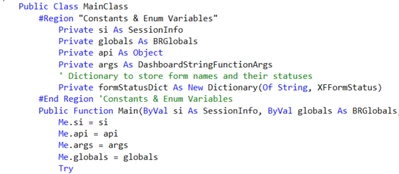
When you run this you should be able to get the same outcome but now at a form level.
